Key Takeaways
OpenLinkProfiler is a free backlink checker. Enter any domain and instantly see its total backlinks, referring domains, referring pages, broken backlinks, and domain rank score.
• Every backlink receives three independent quality scores: backlink rank, page rank, and domain rank. These are displayed using an easy-to-understand A+ to E grading system.
• Broken backlinks are monitored in real time, helping you identify lost links quickly. Fixing them with 301 redirects can recover valuable link equity.
• The BackLink Attributes chart categorizes links into noopener, noreferrer, UGC, and sponsored types, making it easier to understand which backlinks may carry less SEO value.
• Semantic location data shows whether a backlink appears within the main article content or in less valuable areas such as footers, helping you judge its true SEO impact.
• Competitor backlink analysis is completely free. Simply enter a rival domain to uncover their referring domains, anchor texts, and backlink quality scores instantly.
Most bloggers skip backlink analysis. Then they wonder why their rankings flatline.
Here’s the truth: you can’t fix what you don’t know about. And OpenLinkProfiler gives you a free way to see exactly who’s linking to you, what their link quality looks like, and where the risks are.
I’ve gone through every feature this tool offers. In this post, you’ll get a clear, practical breakdown of how to use it, what the data actually means, and how to turn it into real SEO results.
Let’s get into it.
What Is OpenLinkProfiler?
OpenLinkProfiler is a free backlink checker tool. You type in any domain. It pulls the full link profile for that site.
But here’s what you need to know first: you have to sign up and verify your email before you can see any domain metrics. The signup is free, but skipping it means you won’t see any data.
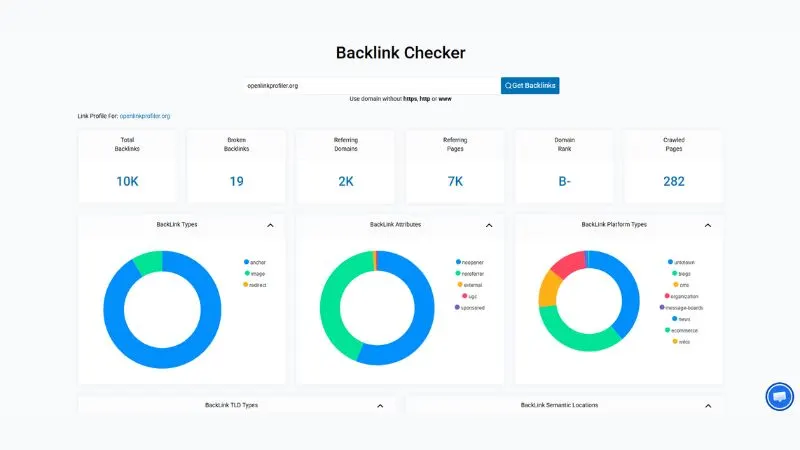
When I ran a test on openlinkprofiler.org itself, here’s what came back:
- Total Backlinks: 10,000+
- Broken Backlinks: 19
- Referring Domains: 2,000+
- Referring Pages: 7,000+
- Domain Rank: B-
That’s a solid dataset for a free tool. You get enough information to make smart decisions about your link-building strategy.
So how do you use it? Start simple.
Go to openlinkprofiler.org. Type your domain without https, http, or www. Click “Get Backlinks.” That’s it.
The results load fast. And what comes back is more detailed than most beginners expect.
How OpenLinkProfiler Shows Your Backlink Data
The dashboard breaks the data into clear sections. Let me walk you through each one.
Total Backlinks vs. Referring Domains
These are two different things. Total backlinks count every individual link pointing to your site. Referring domains count the unique websites behind those links.
For example.com with 10K backlinks but only 200 referring domains? That’s a thin profile. You’re leaning on a small group of sites.
OpenLinkProfiler shows both numbers clearly at the top. So you can spot concentration risk at a glance.
Broken Backlinks
This one is underrated. The tool shows you the exact count of broken backlinks.
In the test data, openlinkprofiler.org had 19 broken backlinks. That means 19 links from other sites are pointing to URLs that no longer exist.
That’s lost link equity. But it’s also a fix you can make this week. Redirect those dead URLs to a live page. You recover the link value instantly.
Domain Rank
OpenLinkProfiler assigns a letter grade to your domain. Think of it like a school report card for your link profile.
The test site scored a B-. That’s a solid mid-range score. Your goal is to push that higher by earning links from stronger referring domains.
OpenLinkProfiler Backlink Attributes: What the Charts Tell You
This is where the analysis gets more interesting.
After the summary stats, you get two pie charts. The first is BackLink Attributes. The second is BackLink Platform Types.
BackLink Attributes Breakdown
The attribute chart shows you what kinds of links you’re getting. In the test data, the breakdown included:
- noopener (dominant slice, shown in blue)
- noreferrer (large green section)
- external (small orange slice)
- ugc (user-generated content, small pink slice)
- sponsored (tiny purple slice)
Most of your links should be natural anchor or noopener links. A heavy UGC or sponsored ratio is a flag. It means Google may discount those links.
Look at your chart. If you see a big sponsored or UGC section and you didn’t pay for those links, that’s a problem. Someone may have submitted your site to spam directories or comment sections.
BackLink Platform Types
The second chart breaks down where your links are coming from:
- Blogs
- CMS platforms
- Organizations
- Message boards
- News sites
- Ecommerce sites
- Wikis
- Unknown sources
A healthy profile has a mix. A profile with 80% message board links is a red flag. It tells Google your link-building looks unnatural.
Anchor Text Distribution: The Part Most Bloggers Ignore
Your anchor text profile matters more than people realize.
If 70% of your backlinks all use the exact same keyword as anchor text, Google notices. That pattern looks manipulative. It can trigger a manual penalty.
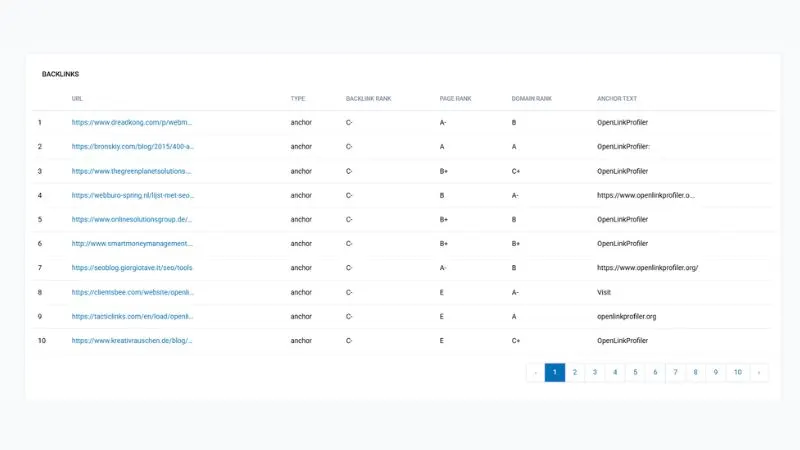
OpenLinkProfiler shows you the anchor text for every individual backlink. Here’s what the test data revealed from the first 10 results:
| # | Source URL | Anchor Text |
|---|---|---|
| 1 | dreadkong.com | OpenLinkProfiler |
| 2 | bronskiy.com | OpenLinkProfiler: |
| 3 | thegreenplanetsolutions… | OpenLinkProfiler |
| 4 | webburo-spring.nl | https://www.openlinkprofiler.o… |
| 5 | onlinesolutionsgroup.de | OpenLinkProfiler |
| 6 | smartmoneymanagement… | OpenLinkProfiler |
| 7 | seoblog.giorgiotave.it | https://www.openlinkprofiler.or… |
| 8 | clientsbee.com | Visit |
| 9 | tacticlinks.com | openlinkprofiler.org |
| 10 | kreativrauschen.de | OpenLinkProfiler |
Notice the variety. Some use the brand name. Some use the full URL. One just says “Visit.” That’s a natural, diverse anchor text profile.
Your goal is similar. You want a mix of branded anchors, naked URLs, generic phrases, and keyword-rich text. Not a wall of the same keyword repeated 50 times.
BackLink Types: Anchor vs. Image vs. Redirect
Every backlink in the OpenLinkProfiler results has a type assigned to it.
In the test data, the top 10 backlinks were all classified as anchor links. That’s standard and healthy. Anchor links carry the most SEO value.
But the tool also tracks:
- Image links (links wrapped around an image, not text)
- Redirect links (links that go through a redirect before landing on your page)
Image links are fine, but carry less context than text anchors. Redirect links are worth watching. Too many redirect-based backlinks can dilute the equity passing to your site.
Backlink Rank Scoring: Page Rank vs. Domain Rank vs. Backlink Rank
This is a feature that separates OpenLinkProfiler from basic free tools.
Each backlink entry shows three separate quality scores:
- Backlink Rank (how strong the specific link is)
- Page Rank (how authoritative the page linking to you is)
- Domain Rank (how strong the entire domain is)
All scores use a letter grade system: A+, A, A-, B+, B, B-, C+, C, C-, D+, D, D-, E.
From the test data results:
| Source | Backlink Rank | Page Rank | Domain Rank |
|---|---|---|---|
| bronskiy.com | C- | A | A |
| webburo-spring.nl | C- | B | A- |
| smartmoneymanagement… | C- | B+ | B+ |
| seoblog.giorgiotave.it | C- | A- | B |
| clientsbee.com | C- | E | A- |
| tacticlinks.com | C- | E | A |
Here’s the insight: a link from a domain ranked A but with a page rank of E? That’s a weak page on a strong domain. The link still has some value, but it’s not a home run.
The best links combine a high domain rank with a high page rank. Those are the links worth chasing in your outreach campaigns.
Link Quality Metrics: How to Spot Toxic Links
OpenLinkProfiler gives you enough data to identify risky backlinks before they cause a problem.
Here’s what to watch for:
Red flags in the data:
- Very low backlink rank (E grade) from a domain you don’t recognize
- UGC or sponsored attributes you didn’t create
- Anchor text that’s spammy, irrelevant, or keyword-stuffed
- Links from message boards or unknown platform types at scale
- Multiple links from the same domain with different page ranks
Green flags that show healthy links:
- Mix of A and B grade domains
- Branded or natural anchor text
- Links from blogs, news sites, and organization pages
- Anchor, not redirect, as the link type
- Backlinks sitting in article or section semantic locations (more on that below)
Use these filters as your quality checklist every time you do a backlink audit.
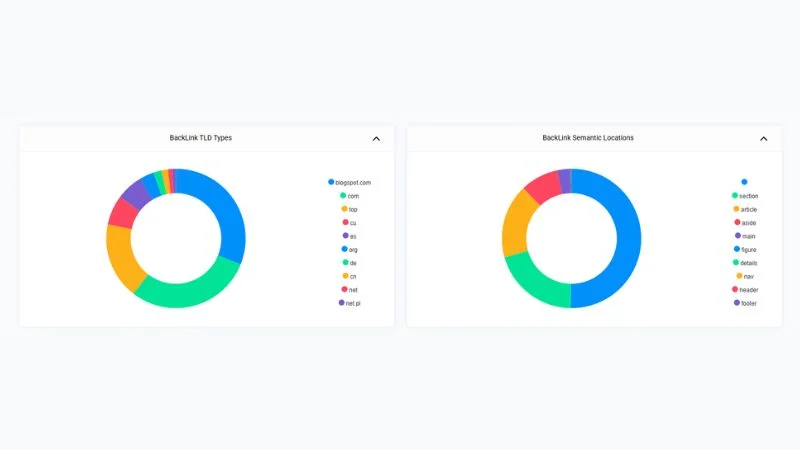
Backlink Semantic Locations: Why This Data Actually Matters
This is one of OpenLinkProfiler’s more advanced features. And most people skip it entirely.
The tool classifies where on the linking page your backlink sits:
- Article (inside the main content body)
- Section (within a defined page section)
- Main (in the main body area)
- Aside (sidebar content)
- Nav (navigation menu)
- Header (page header)
- Footer (page footer)
- Figure (inside an image caption or figure block)
- Details (inside an expandable/collapsible section)
Why does this matter?
A link inside an article or the main content area carries more weight. Google’s algorithm gives more relevance signals to contextual links inside body content.
A footer link from every page of a 500-page website? That could look like a network link scheme. It’s worth investigating if you spot a pattern like that in your profile.
When you see the semantic location breakdown, aim for a profile where most of your links fall in article, main, or section locations.
TLD Distribution: What Country Domains Are Linking to You
OpenLinkProfiler also shows you a breakdown of BackLink TLD Types. That’s the top-level domains linking to your site.
In the test data, the breakdown included:
- blogspot.com
- .com
- .top
- .cu
- .es
- .org
- .de
- .cn
- .net
- .net.pl
For a site targeting a global English audience, .com and .org links are strongest. But if your site is local, say targeting Germany or Spain, then .de or .es links carry extra relevance signals for those regional searches.
If you’re seeing a lot of .top, .xyz, or other low-trust TLDs, that’s worth a closer look. Those domains are often associated with spam link networks.
How to Use OpenLinkProfiler to Audit Competitor Backlinks
You’re not limited to checking your own domain. That’s where OpenLinkProfiler gets really useful.
Here’s a simple competitor analysis workflow:
Step 1: Identify your top 3 ranking competitors for your target keyword.
Step 2: Run each competitor domain through OpenLinkProfiler.
Step 3: Note their referring domain count and Domain Rank score.
Step 4: Go to their backlink list. Sort by Domain Rank. Find the A and B grade domains linking to them.
Step 5: Those are your outreach targets. If those sites are linked to your competitor, there’s a real chance they’ll link to you too.
This process alone can fill your outreach pipeline for months.
Exporting Backlink Data and Building Your Disavow File
If you find toxic links in your profile, you need to act. Waiting on a Google manual action is not a strategy.
OpenLinkProfiler gives you a list of every backlink with its quality scores. Use it to build your disavow list.
Heads up: OpenLinkProfiler claims to offer CSV and PDF export on its website. However, I could not find any visible export option inside the tool during my testing. So for now, manually copy the backlink data you want to act on, or screenshot the results for reference.
Here’s the workflow:
Step 1: Note down the toxic links from your backlink list. Focus on E-grade pages from suspicious domains, UGC or sponsored links you didn’t create, and links with spammy anchor text.
Step 2: Create a disavow file. List the domains (not individual URLs) you want Google to ignore.
Step 3: Submit the file through Google Search Console’s Disavow Links tool.
This cleanup process works. But don’t be trigger-happy. Only disavow links you’re confident are harmful. Removing good links by mistake will hurt your rankings.
Link Freshness: Tracking When Links Were Built
A healthy backlink profile grows steadily over time. A profile with 1,000 links that all appeared in one week? Google sees that as suspicious.
OpenLinkProfiler helps you track the age and pattern of your incoming links. By reviewing when links were discovered and indexed, you can spot:
- Unnatural link velocity spikes
- Sudden drops in new link acquisition
- Periods where your competitors outpaced you
This data is useful for planning, too. If you run a content campaign or PR push, you can verify that the links actually landed in your profile.
OpenLinkProfiler vs. Paid Backlink Tools: What’s the Real Difference?
Free tools have limits. Let’s be honest about what OpenLinkProfiler can and can’t do.
What OpenLinkProfiler does well:
- Shows 10,000+ backlinks for free
- Provides detailed anchor text for each link
- Breaks down platform types, TLDs, and semantic locations
- Gives letter-grade scores for backlink, page, and domain quality
- No credit card required
Where paid tools have the edge:
- Ahrefs and Semrush index hundreds of billions of backlinks. OpenLinkProfiler’s index is smaller.
- Paid tools offer keyword difficulty, traffic estimates, and SERP tracking alongside backlink data.
- Historical data going back years is only available in paid plans elsewhere.
- Bulk analysis of multiple domains at once is a paid feature on most platforms.
So what’s the verdict? If you’re just starting out or running a small site, OpenLinkProfiler is a solid starting point. It gives you real, actionable data at zero cost.
If you’re managing a larger site or need competitor-level depth, you’ll want to pair it with a paid tool eventually. But OpenLinkProfiler is a smart first step, not a toy.
Common Mistakes to Avoid When Using a Backlink Checker
I’ve seen people misuse backlink data in ways that hurt their SEO. Here are the main ones:
Mistake 1: Disavowing too aggressively. Not every low-grade link is toxic. Some older or smaller sites just have lower scores. Disavow only links that are clearly spammy or harmful.
Mistake 2: Chasing quantity over quality. 50 links from B and A-grade domains beat 500 links from E-grade pages. Every time. Stop obsessing over total link count.
Mistake 3: Ignoring broken backlinks. Those 19 broken links in the test site? Each one is a fix that takes under five minutes. Set up 301 redirects. Done.
Mistake 4: Checking once and forgetting. Your backlink profile changes constantly. Run a check at least once a month. New spammy links can appear without warning.
Mistake 5: Only auditing your own site. Some of the best link-building intelligence comes from analyzing competitors. Use OpenLinkProfiler on the sites ranking above you.
FAQs About OpenLinkProfiler
Is OpenLinkProfiler completely free to use?
Yes. OpenLinkProfiler is free for basic backlink checks. You can enter any domain and instantly see total backlinks, referring domains, broken links, domain rank, anchor text, and more, without paying anything or entering a credit card.
How accurate is OpenLinkProfiler’s backlink data?
OpenLinkProfiler uses its own backlink index. It shows real data, including backlink rank, page rank, and domain rank for each link. For most small to mid-sized sites, the data is accurate enough for audits and outreach research. For enterprise-level campaigns, you may want to pair it with Ahrefs or Semrush for a larger index.
Can I check my competitor’s backlinks using OpenLinkProfiler?
Yes. Just enter your competitor’s domain without https, http, or www. You’ll see their full link profile, including referring domains, anchor texts, and link quality scores. This is one of the best free ways to find link-building targets for your own site.
What does “Domain Rank” mean in OpenLinkProfiler?
Domain Rank is a letter-grade score (A+ to E) that shows how strong a linking website is overall. An A-grade domain passing you a link carries far more SEO value than an E-grade one. When building backlinks, always aim for links from B-grade domains and above.
How do I find toxic or spammy backlinks using OpenLinkProfiler?
Look for links with an E page rank, UGC, or sponsored attributes you didn’t create, and spammy or irrelevant anchor text. Also, check the BackLink Platform Types chart. A high share of message-board or unknown-source links is a red flag worth investigating before you submit a disavow file to Google.
What is a broken backlink, and why does it matter?
A broken backlink is a link from another site that points to a URL on your site that no longer exists. You lose all the link equity from that page. You can fix it by setting up a 301 redirect from the dead URL to a live, relevant page. OpenLinkProfiler shows you the exact count of broken backlinks so you know where to start.
Can I export backlink data from OpenLinkProfiler?
OpenLinkProfiler mentions export on its website, but I couldn’t find any visible export option inside the tool during testing. For now, manually note down or screenshot the data you need.
How often should I check my backlinks?
At least once a month. New backlinks appear and disappear constantly. If you’re running an active link-building campaign, check weekly. Catching a sudden spike of spammy links early is much easier than cleaning up a penalty after Google notices.
What is the difference between “Referring Domains” and “Total Backlinks”?
Total backlinks is the full count of every individual link pointing to your site. Referring domains is the number of unique websites behind those links. A site with 10,000 backlinks but only 100 referring domains has a concentrated, risky profile. You want both numbers to grow together over time.
Does OpenLinkProfiler show nofollow and dofollow links separately?
Yes. The BackLink Attributes section breaks down your links by type, including noopener, noreferrer, external, UGC, and sponsored tags. This helps you understand what portion of your links passes full SEO value and which ones Google may treat differently.
Conclusion
OpenLinkProfiler gives you a lot for free.
Total backlinks. Referring to domain counts. Broken link data. Anchor text analysis. Backlink rank scoring. Platform type breakdowns. Semantic location data. TLD distribution.
That’s a full picture of your link profile, without paying a rupee.
The key is what you do with the data. Spot the weak links. Find your competitors’ best sources. Build a smarter outreach list. Fix the broken links this week.
SEO isn’t about secret tactics anymore. It’s about executing the fundamentals better than the next person. And a solid backlink audit is one of the most underused moves in the game.
If you want to see how OpenLinkProfiler stacks up against other top options, here’s a full comparison of the best backlink checker tools for both free and paid users.
So here’s the question I’ll leave you with: when you look at your backlink profile today, do you actually know which of your links are helping you, and which ones might be quietly holding you back?