Key Takeaways
- BuzzSumo pulls from 8 billion pieces of content and shows you what earns links, what gets shared, and what your audience searches on Reddit and Quora. You pick from proven data instead of guessing.
- The Question Analyzer returns 10,000+ real questions from Reddit, Quora, and Stack Exchange for any topic. For “SEO” it surfaced 2,352 “what” questions and 1,420 “how” questions. That is a full content calendar.
- Topic Explorer maps every semantic cluster around your topic. One search returns eight ranked subtopics, content ideas, and keyword variations under each one. Use it to build a content pillar, not a single post.
- The Media Database covers 700,000 journalists with recent articles, average engagement, publication tier, and email. 330,000 profiles update monthly so you pitch based on last week’s work, not two-year-old data.
- Plans start at $199/month. Media Database and outreach tools only unlock at $299/month. The free trial runs 7 days on the Suite plan.
BuzzSumo proves that your competitors aren’t smarter than you.
They just know what to write before they write it.
That’s the core promise of BuzzSumo. Media mentions in minutes. Content ideas for days. It sounds like a clever tagline, but after spending real time inside the platform, I can tell you it’s a surprisingly accurate description of what the tool actually does.
BuzzSumo pulls insights from an index of 8 billion pieces of content. It shows you what’s trending, what’s earning links, what questions your audience is asking, and which journalists are covering your topic right now. Every section of the tool gives you a different angle on the same objective: stop guessing and start publishing with data.
Here’s the full breakdown, straight from the interface.
What BuzzSumo Is (And Who It’s Built For)
BuzzSumo calls itself a content intelligence platform. The nav has six main areas: Home, Discover, Content, Outreach, Influencers, Monitoring, and Projects. Each one handles a different part of the content marketing process, from finding ideas all the way to tracking press coverage.
HubSpot, Expedia, Ogilvy, BuzzFeed, and The Telegraph all use it. Rise at Seven, theCLIKK, and Connective3 have published case studies. David White, Founder of Connective3, said BuzzSumo picks up new links faster than any other link index tool he’s used. Worth noting.
The free trial is 7 days on the Suite plan. Paid plans start at $199/month. Annual billing saves 20%.
What Does BuzzSumo’s Home Dashboard Show You?
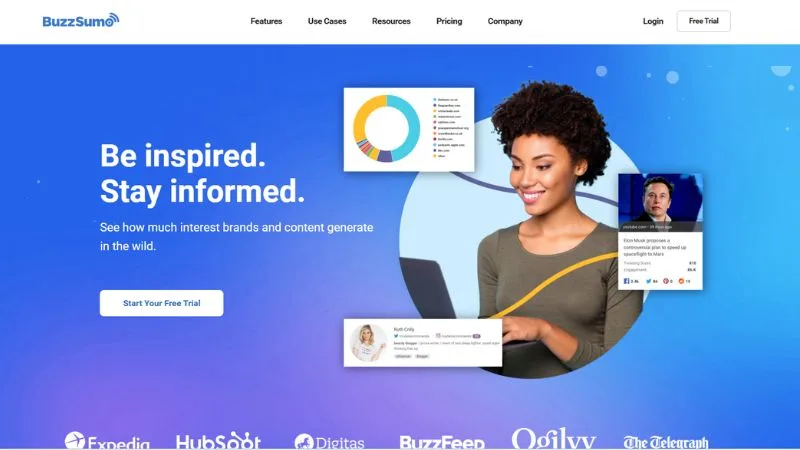
The moment you log in, BuzzSumo gives you three core actions right at the top.
Research Popular Content — Browse the world’s largest index of social engagement data. Find content that works and get actionable insights.
Discover New Ideas — Spark content ideas by browsing topics and trends. See what’s going down and what’s rising up.
Find Top Influencers — Identify leading voices who can help amplify your reach. Find, follow, and shortlist taste-makers and trend-breakers.
Below that are two panels. Recently Used Saved Searches keeps your past queries ready so you don’t retype the same search twice. And My Recent Feeds shows your topic feeds, News, Education, Sports, Entertainment, all in one glance, with a “View All Top Stories” shortcut.
The whole dashboard is designed for one thing: to get to your research fast, without starting from scratch every time.
The Discover Menu: 5 Tools That Cover Your Entire Research Process
The Discover dropdown has five tools: Content Ideas Generator, Trending Feeds, Keyword Tool, Topic Explorer, and Question Analyzer. There’s also a Brief Generator marked as New.
If you’re using a separate keyword research tool, a separate trends tool, and a separate content ideation tool, this one menu covers all of it.
Content Ideas Generator
The description in the tool says it clearly: “Get ideas from our index of 8 billion pieces of content.”
You enter a topic, hit search, and get a three-step workflow: Research your topic, Create your content, Distribute your content.

Step 1 — Research Your Topic
The first section is “Ideas from the most evergreen content.” Articles are sorted by Evergreen score, Linking Domains, and Engagement. There’s also a “B2B Publishers Only” checkbox to filter out consumer content if you’re working in a professional niche.
For “SEO,” the top five results from 1,568,330 articles:
| Article | Evergreen | Linking Domains | Engagement |
|---|---|---|---|
| 7 Potret Wisuda Roh Yoon Seo (haibunda.com) | 224 | – | 10.1K |
| Google E-E-A-T: What It Is & How To Demonstrate It (SEJ) | 123 | 575 | 1.3K |
| What is generative engine optimization (GEO)? (SEL) | 87 | 399 | 203 |
| Semrush: AI Overviews’ Impact on Search in 2025 | 73 | 655 | 166 |
| We Studied the Impact of AI Search on SEO Traffic (Semrush) | 69 | 604 | 125 |
Look at that Semrush AI Overviews piece. 655 linking domains, only 166 social engagements. High backlink potential, low social sharing. The E-E-A-T article has 575 linking domains AND 1.3K engagement. Two very different content profiles. That asymmetry tells you which angles attract links versus which ones get shared.
Below the evergreen content, the second section shows “Ideas from popular keywords.” For SEO (English / United States):
| Keyword | Volume | CPC |
|---|---|---|
| what is seo | 27.1K | $6.87 |
| seo marketing | 12.1K | $39.76 |
| seo for website | 8.1K | $25.44 |
| seo course | 5.4K | $9.29 |
| seo marketing course | 5.4K | $9.29 |
Hit “More Keywords” to load more. Hit “More Content Ideas” to expand beyond the initial five articles.
The third section links directly to Wikipedia, Quora, and Reddit for that keyword. One click to jump from BuzzSumo’s data into live community conversations.
BuzzSumo also shows you the top-ranking Google results for your keyword right inside the interface. For “SEO,” it pulled up the #1 result (Wikipedia with section headings), #3 (mtu.edu), and #4 (moz.com). You can see how the top-ranking articles are structured before you start writing.
Step 2 — Create Your Content
This section draws from an analysis of 1,569,159 articles with 27,672,389 total social engagements over five years. For B2B publisher content, the data shows:
Best formats by engagement:
- Lists rank highest
- Interviews and How-To Articles outperform average
- Press Releases and Newsletters consistently underperform
Best content length:
- 3,000 to 10,000 words averages an engagement score of 22
- Under 1,000 words averages significantly lower
- Long-form wins here, clearly
Step 3 — Distribute Your Content
Same dataset, different lens. For B2B content:
- Facebook drives the highest average engagement
- X (Twitter) is second
- Reddit is the lowest
Best day to publish: Wednesday. Articles published on Wednesday average an engagement score of 22. Weekends underperform across the board.
Brief Generator
Right inside Content Ideas Generator, there’s a “Brief Generator” button tagged as New. It creates a full content brief from your research in one click. Their exact description: “Create a content brief from this search, for yourself, your team, or freelancers, in just one click.”
If you’re working with freelancers, this feature alone is worth the subscription.
Trending Feeds
Trending Feeds is a live, auto-refreshing feed of what’s breaking right now.
The left sidebar has 13 pre-built category feeds ready to go: News, Sports, Entertainment, Tech, Business, Video, Fashion, Science, Politics, Health, Marketing, Education, and Coronavirus.
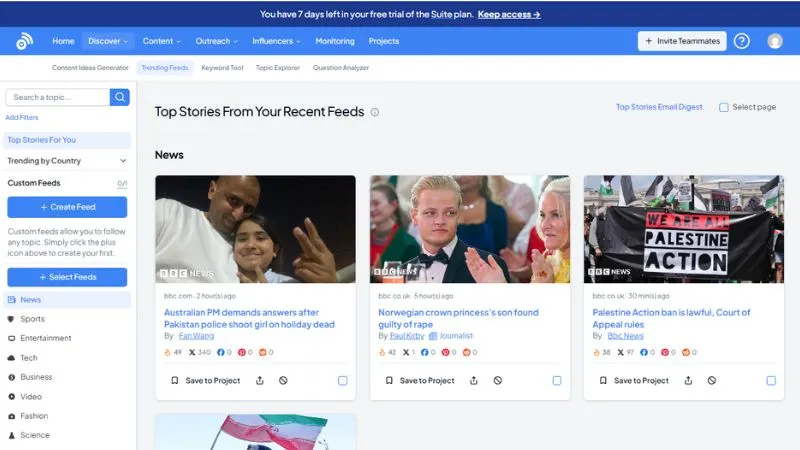
Above those categories, the sidebar also shows:
- Top Stories For You (personalized to your interests)
- Trending by Country (geography dropdown)
- Custom Feeds with a counter showing how many you’ve created vs. your plan limit
Two buttons sit in the sidebar: “+ Create Feed” and “+ Select Feeds.”
Create Feed lets you build a custom feed around any topic you want. The sidebar text says: “Custom feeds allow you to follow any topic. Simply click the plus icon above to create your first.”
Select Feeds lets you browse and activate pre-built topic feeds BuzzSumo already maintains.
In the main content area, the feed header has four controls:
- Auto Refresh Feed toggle (on by default, refreshes every 60-100 seconds)
- Create Alert button
- Share button
- RSS button
Share the feed with your team. Or pipe it into another tool via RSS.
The filter bar narrows results by:
- Time range: 24 Hours Ago by default
- Country: All Countries or specific regions
- Language: All Languages or specific ones
- Reset to clear everything
The sort dropdown on the right has six options: Trending Score (default), Total Engagement, Facebook Engagements, X Shares (Twitter), Pinterest Shares, and Reddit Engagement.
Each article card shows source, time published, headline, and a per-platform engagement breakdown. One card in the interface showed 242 trending score, 1 X share, 0 Facebook. Another showed 379 X shares, 0 Facebook. A third had 492 X shares and nothing on Facebook.
That last one matters. 492 Twitter shares with zero Facebook activity means it’s a Twitter conversation. You promote it differently than a Facebook story.
Each card has three quick actions: Save to Project, Share, and a mute option.
Keyword Tool
Three numbers, front and center: Search Volume, Cost Per Click, and Articles Published.
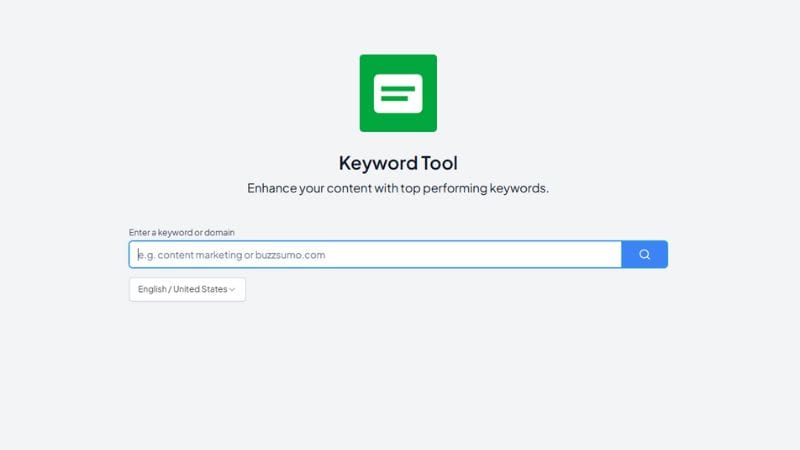
For “SEO”:
- Search Volume: 135K monthly
- CPC: $20.08
- Articles Published: 14.3K
Below that, two tabs: Related Keywords and Similar Keywords. The table shows each keyword’s trend chart, volume, and CPC. Under each keyword, there’s a “View Full Insights” link to dig deeper. The export button is in the top right.
The language and country selector (English / United States by default) sits above the table. Switch markets with one click.
Topic Explorer
This is the most underrated tool in BuzzSumo.
You enter a topic, and it maps every related semantic angle. For “SEO,” it returned a word cloud with dozens of related terms, then surfaced the eight most relevant ones in ranked order:
- seo tools
- website optimization
- search engine marketing
- on page seo
- seo content
- search engine ranking
- seo services
- keyword research
But it goes deeper. For each related topic, it shows actual content ideas and related keyword variations.
Under “website optimization”: content ideas included “Tammet’s SEO Guide: How to Rank Your Content Fast!” and “What are some advanced SEO tactics businesses should implement?” Related keywords: “website optimization test,” “website optimization meaning,” “website optimization checker,” plus 6 more.
Under “seo agencies”: content ideas included “SEO Agency vs SEO Consultant: Pros, Cons & How to Choose in 2026.” Related keywords: “seo agencies in India,” “seo agencies in USA,” plus 7 more.
Every topic card has an “Insights & Content Ideas” link. There’s a “More Topics” button at the top to load additional clusters.
This is how you build a content cluster. Find the hub topic, map the subtopics, and assign articles to each one.
Question Analyzer
10,000+ real questions from Reddit, Quora, Stack Exchange, and other Q&A platforms. For any topic you enter.
The filter bar has four controls: time range, country TLDs, site types, and sources. Two tabs: Questions and Related Themes. And a Visualisation toggle that switches between a circle diagram and a flat list.
For “SEO,” the circle diagram broke down questions by type:
- how: 1,420
- what: 2,352
- why: 303
- which: 269
- are: 116
- can: 387
- when: 10
- where: 58
- who: 62
- will: 34
There’s also a “Sorted by date” toggle in the top right if you want the most recent questions instead of the most relevant ones.
The “Most recent questions” panel showed live examples:
- “How can SEO strategies save money on paid ads?”
- “How does mobile-first indexing impact small business websites?”
- “How does AI SEO actually work in practice?”
- “Why won’t website content boost your Google Maps keyword rankings?”
- “Are you monitoring the performance of your keywords regularly?”
Every one of those is a blog post. Or a YouTube video. Or an FAQ section. BuzzSumo gives you 2,352 “what” questions and 1,420 “how” questions for a single topic. That’s your content calendar.
Free trial users can see 5 pages of results. Paid users get the full 10,000+. There’s an Export button in the top right.
The Content Menu: 4 Analyzers
The Content dropdown has four tools: Content Analyzer, Facebook Page Analyzer, YouTube Analyzer, and Backlink Analyzer. The Content Analyzer also has an “Analysis Report” tag.
Content Analyzer
Enter a keyword or a domain, set a date range, and get articles ranked by engagement data. The language selector inside this tool supports country and language-specific filtering that the Content Ideas Generator doesn’t. If you need data for a specific market, this is where you go.
Facebook Page Analyzer
Benchmark your Facebook page against competitors. See what content earns the most engagement for any page. Useful for any brand that runs an active Facebook presence.
YouTube Analyzer
Top-performing videos for any topic or subject. If you produce video content, run your topic through here before scripting anything.
Backlink Analyzer
Find backlinks for any URL or domain. David White at Connective3 specifically called this out: BuzzSumo picks up new links faster than other index tools. For link-building outreach, that speed advantage is real because the first team to reach out to a new linker usually gets the best response.
Also, check: 8 Backlink Checker Tools Compared
The Outreach Menu: Media Database, Media Lists, and Pitches
The Outreach dropdown has three tools: Media Database, Media Lists, and Pitches. There’s a resource link at the bottom: “How to Use BuzzSumo to Research & Outreach to Journalists.”
Media Database
700,000 journalists. Every profile shows:
- Average engagement per article
- Publication tier (Top, Mid, or niche)
- Twitter/X follower count
- Topics covered
- Publications they write for
- Email address
- Audience reaction breakdown: Angry, Sad, Haha, Wow, Love percentages
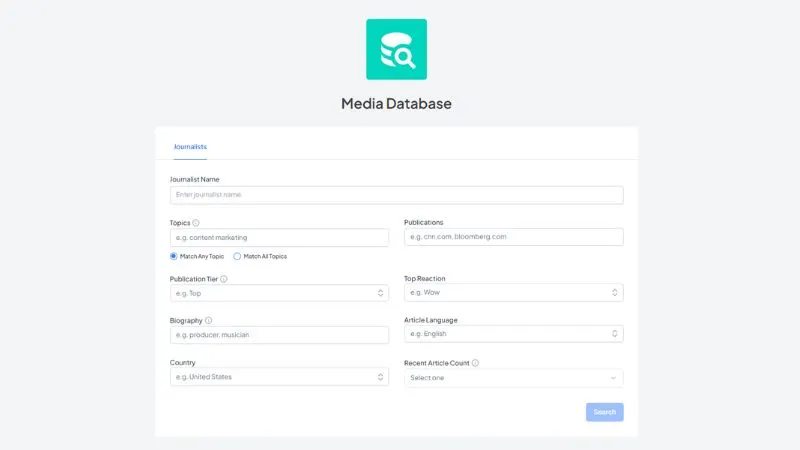
One journalist profile in the interface showed 5,120 X followers, average engagement of 1K, a Top publication tier, insider.com and businessinsider.com as publications, and TikTok as a primary topic with 47 more. Top audience reaction: Haha at 54%.
330,000 profiles get updated every month. That keeps contact info current. You’re pitching based on what someone published last week, not two years ago.
The filter sidebar: journalist name, topics (Match Any Topic or Match All Topics), publications, publication tier, top reaction, and biography keywords.
BuzzSumo claims 2x more niche topic results than any other media database. For agencies in specialized verticals, that’s a meaningful edge.
Media Lists
Build curated journalist lists. From a saved list, you can see what every journalist on it published today in one click. Daily media monitoring drops to a 5-minute task.
Pitches
AI-powered pitching tool built directly into BuzzSumo. Write personalized pitches, send them, and manage your entire outreach workflow without leaving the platform. Their description: “Write relevant pitches, faster with our AI pitching tool. Discover, pitch, outreach, and report all in one place.”
Influencer Discovery: 4 Platform-Specific Tools
The Influencers dropdown:
- X Influencers (Twitter): Find influencers by topic or username
- Facebook Pages: Find the most relevant Facebook pages for your subject
- TikTok Influencers: Most active and influential TikTok users around your topic
- YouTube Influencers: Most influential YouTube channels around a subject
Resource link at the bottom: “How to Use Influencer Marketing to Promote Content.”
All four tools search by topic relevance, not just follower count. So you’re finding creators whose audiences actually care about the subject, not just people with big numbers.
Monitoring: 7 Alert Types
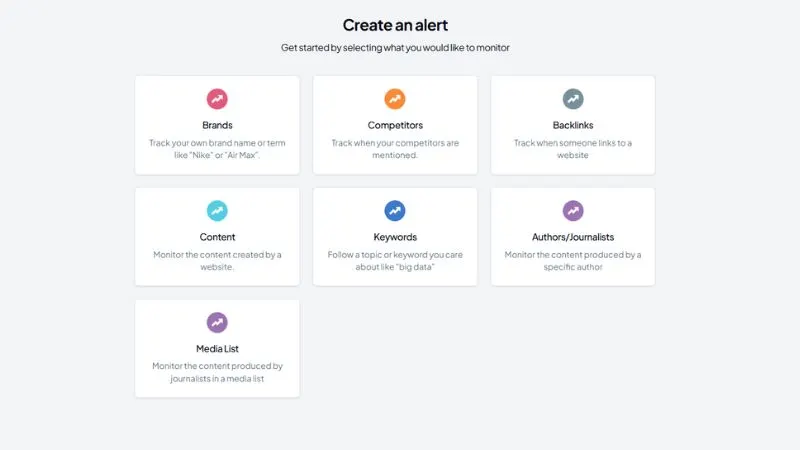
The Monitoring page shows a “Create an alert” setup with seven categories:
| Alert Type | What It Tracks |
|---|---|
| Brands | Your brand name or any term like “Nike” or “Air Max” |
| Competitors | When competitors get mentioned |
| Backlinks | When someone links to a website |
| Content | Content published by a specific website |
| Keywords | A topic or keyword like “big data” |
| Authors/Journalists | Content by a specific author |
| Media List | Content by journalists in a saved media list |
You can also create alerts directly from Trending Feeds. See a story breaking, hit “Create Alert,” and BuzzSumo starts monitoring it immediately.
The PR & Comms plan ($299/mo) adds Coverage Reports, which automatically compile media mentions into shareable reports.
BuzzSumo Use Cases: What the Platform Is Actually Built For
Four documented use cases in BuzzSumo’s own navigation:
Competitor Intelligence: What content performs best in your niche, what angles competitors use, what’s earning them links and press.
Content Strategy: A full publishing calendar built on proven engagement data, not instinct.
Crisis Alerting: Systematic brand and keyword monitoring across seven alert types so you catch issues early.
Digital PR: Topic research, journalist discovery, pitch creation, and coverage tracking all in one place. BuzzSumo has been positioning itself as a Digital PR platform, not just a content tool.
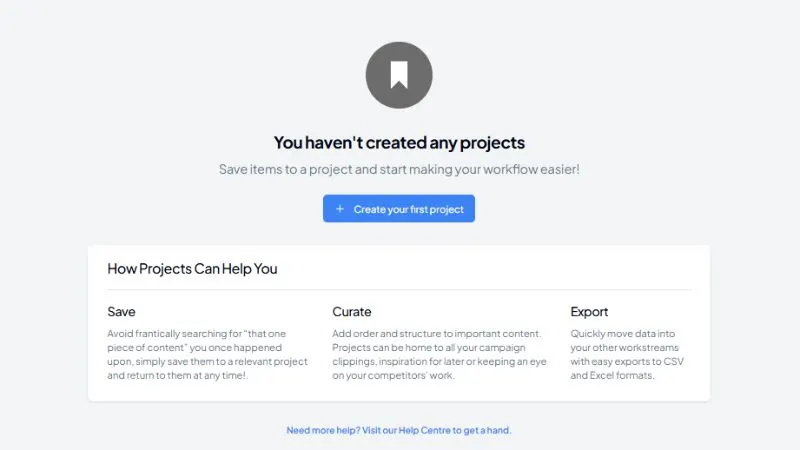
Projects: Saving, Curating, and Exporting Your Research
Projects is BuzzSumo’s internal workspace. Three functions:
Save: Any article, journalist, or keyword result can be saved to a project. No more hunting for something you found last week.
Curate: Organize campaign clippings, competitor examples, and content inspiration. Projects hold all of it.
Export: CSV and Excel exports to move data into your wider workflow.
The “Save to Project” button appears on every article card across the platform. Find a competitor article with 600 linking domains in the Content Analyzer, save it to your Competitor Research project in one click.
The “Invite Teammates” button in the top nav lets you add team members to the platform.
BuzzSumo Pricing: What You Get at Each Level
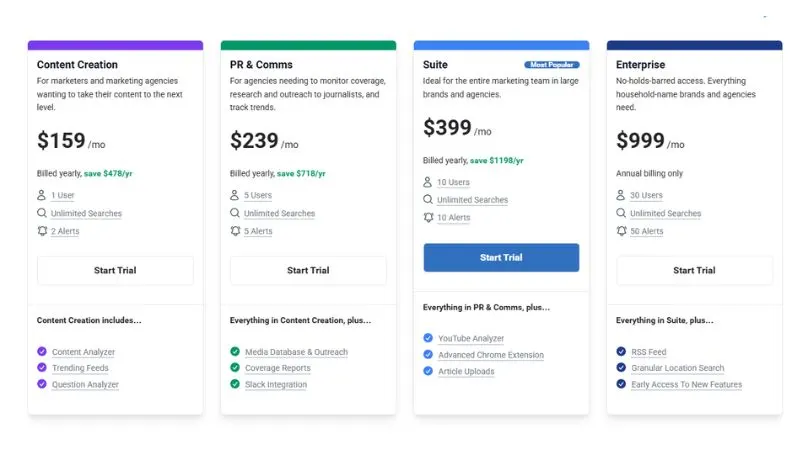
BuzzSumo offers several plans depending on how advanced your content and PR workflows are. All plans include unlimited searches, while annual billing provides a discount compared to paying monthly.
| Feature | Content Creation | PR & Comms | Suite | Enterprise |
|---|---|---|---|---|
| Monthly Price | $199/mo | $299/mo | $499/mo | $999/mo |
| Users | 1 | 5 | 10 | 30 |
| Searches | Unlimited | Unlimited | Unlimited | Unlimited |
| Alerts | 2 | 5 | 10 | 50 |
| Content Analyzer | Yes | Yes | Yes | Yes |
| Trending Feeds | Yes | Yes | Yes | Yes |
| Question Analyzer | Yes | Yes | Yes | Yes |
| Media Database | No | Yes | Yes | Yes |
| Outreach Tools | No | Yes | Yes | Yes |
| Coverage Reports | No | Yes | Yes | Yes |
| Slack Integration | No | Yes | Yes | Yes |
| RSS Feed Capacity | Limited | Limited | 30 Articles/Month | 10,000 Articles/Month |
All plans provide access to BuzzSumo’s core research capabilities, but the higher tiers are clearly built for PR teams, agencies, and larger organizations that require collaboration and advanced monitoring.
BuzzSumo also offers a 7-day free trial on eligible plans, giving you an opportunity to test the platform before committing.
The platform additionally provides a Chrome Extension and API access for teams that want to integrate BuzzSumo into existing workflows.
5 Things Most BuzzSumo Users Get Wrong
1. Only using the Content Analyzer. The Topic Explorer and Question Analyzer are where real content planning happens. Most users never open them.
2. Skipping the “B2B Publishers Only” filter. Without it, your research mixes consumer content into your B2B data. One checkbox makes the results significantly sharper.
3. Setting up one alert and stopping. BuzzSumo has seven alert types. Your competitors likely have Competitor alerts, Keyword alerts, and Author alerts all running. You probably have one brand alert.
4. Using Trending Feeds like a news reader. The actual move is to spot a breaking story, create an alert, and build a content angle around it before your competition notices.
5. Ignoring the Brief Generator. One click converts your research into a content brief. If you work with freelancers or a content team, this saves hours per week.
BuzzSumo Pros and Cons
No tool is perfect, and BuzzSumo is no exception. After reviewing every major module inside the platform, here’s where it genuinely stands out and where it still has limitations.
Pros
- Finds trending topics and emerging opportunities before they become saturated.
- Combines content research, outreach, monitoring, and influencer discovery under one roof.
- Question Analyzer uncovers thousands of real audience questions that can become blog posts, FAQs, videos, and campaigns.
- Media Database gives Digital PR teams direct access to a large journalist network.
- Backlink discovery is fast enough to support reactive outreach campaigns.
- Projects make collaboration easier for agencies and in-house teams.
- Data-backed engagement metrics help reduce guesswork during content planning.
- Strong filtering options allow you to narrow insights by country, language, topic, and source.
Cons
- The starting price is high for freelancers, hobby bloggers, and small websites.
- Lower-tier plans limit the number of alerts available.
- Some advanced features require time to learn and fully utilize.
- The platform delivers the most value when multiple modules are used together.
- Social engagement signals should complement SEO research, not replace it.
- Teams focused only on keyword research may find more cost-effective alternatives.
BuzzSumo Alternatives Worth Considering
BuzzSumo alternatives are tools that do one or more of the same jobs: content research, trend monitoring, influencer discovery, journalist outreach, and brand monitoring.
Some cover all five. Most specialize in one or two.
People switch for three reasons. Budget. Missing features. Or they already pay for Semrush or Ahrefs and don’t want an overlap.
No tool here is a perfect BuzzSumo copy. But each one solves a specific problem better.
1. Semrush — Best for SEO-first content teams. Deeper keyword and backlink data than BuzzSumo. No journalist database.
2. Ahrefs Content Explorer — Best for finding link-earning content. Pure content research and backlink analysis. Nothing else.
3. Meltwater — Best for enterprise PR teams. Full media intelligence stack. Expensive, built for large budgets.
4. Mention — Best for brand monitoring on a budget. Tracks mentions across news, blogs, and social. Simple and affordable.
5. SparkToro — Best for audience research. Shows where your audience spends time online. Unique approach, no content data.
6. Exploding Topics — Best for spotting trends early. Finds what’s growing before it peaks. Single-purpose tool.
7. Prowly — Best for journalist outreach. 1 million+ media contacts, pitching tool, coverage reports. PR-first platform.
8. Brand24 — Best for real-time mention tracking. Covers social, news, blogs, podcasts, and reviews. No content research.
9. Feedly — Best for content curation. RSS-based feed with AI filtering. Cheapest option on this list.
10. Similarweb — Best for competitor traffic research. Shows which content drives traffic on any site. No social data.
FAQs
Is there a free trial?
Yes. BuzzSumo gives you 7 days on the Suite plan. No credit card required upfront.
Does the Content Creation plan include the Media Database?
No. Journalist profiles, outreach tools, and coverage reports only unlock at the PR and Comms plan, which starts at $299/month.
What is the Question Analyzer actually useful for?
You enter any topic and get 10,000+ real questions from Reddit, Quora, and Stack Exchange. Filter by question type, date, or source. Every result is a potential blog post, FAQ section, or video script.
How current is the journalist data?
BuzzSumo updates 330,000 profiles every month. Each profile shows recent articles, average engagement per piece, and topics covered in the last few weeks.
Can I use BuzzSumo for backlink research?
Yes, but it is not the primary use case. The Backlink Analyzer picks up new links faster than most index tools, which helps with reactive outreach. For deep backlink analysis, a dedicated tool like LinkMiner or Ahrefs works better alongside it.
Does it work for YouTube and TikTok research?
Yes. The YouTube Analyzer surfaces top-performing videos by topic. The TikTok Influencers tool finds creators by topic relevance, not just follower count.
What does the Brief Generator do?
One click converts your Content Ideas research into a structured content brief. If you send briefs to freelancers regularly, this saves meaningful time every week.
Is BuzzSumo worth it for solo bloggers?
At $199/month, it is hard to justify for low-volume publishers. The platform pays off when content directly drives traffic, leads, or press coverage at scale.
Conclusion
BuzzSumo earns its reputation as a serious content intelligence platform.
It goes far beyond simple topic discovery. From identifying high-performing content and uncovering audience questions to finding journalists, tracking mentions, and monitoring competitors, the platform helps marketers make decisions using evidence instead of assumptions.
If you’re an occasional publisher with a limited budget, the price may feel difficult to justify.
However, if content plays a meaningful role in generating traffic, leads, PR coverage, or revenue for your business, BuzzSumo can save significant time while helping you create campaigns with a higher probability of success.
The biggest advantage isn’t that BuzzSumo gives you more data.
It’s that it gives you the right data at the moment you need to make a decision.
That’s ultimately what turns content research into measurable results.