Key Takeaways
- Answer The Public turns Google and Bing autocomplete data into a visual question map, so you see the exact words your audience types instead of guessing at keywords.
- The free plan gives you one search a day. Paid plans start at $6.66/month and add search volume, CPC data, and the new Content Studio AI feature.
- Run your seed keyword through the Questions and Comparisons wheels first. That’s where buyer intent hides, and it tells you whether to write a tutorial or a comparison post.
- Pair it with SEMrush or Ahrefs before you commit to writing. Answer The Public shows you what people ask, not how often they ask it.
Most keyword tools tell you what people search for.
Answer The Public shows you what they’re thinking.
The questions they type into Google when they’re frustrated. The comparisons they’re making before buying. The problems they desperately want solved, but would never ask out loud.
That’s why brands like Microsoft, Amazon, and Netflix use search data to understand their audience instead of guessing.
If you’ve ever struggled with writer’s block, published posts that nobody reads, or wondered what content people actually want, Answer The Public might completely change the way you do keyword research.
Let’s get into it.
What Is Answer The Public?
Answer The Public is a visual keyword research tool built by NP Digital, Neil Patel’s digital marketing agency. You type in a seed keyword, and the tool pulls back a massive “search cloud” of real questions, prepositions, comparisons, and related searches that people are actively typing into Google and Bing.
It’s not giving you made-up data. It works by scraping autocomplete suggestions from search engines. When you start typing “coffee” into Google, it instantly suggests “coffee near me,” “coffee benefits,” “coffee during pregnancy.” Answer The Public automates that process across hundreds of modifiers like who, what, where, when, why, and how, then packages everything neatly into a visual map.
The result? You see exactly how real people phrase their problems. Not your industry jargon. Their actual words.
Sometimes that’s all it takes.
One question hidden in those search suggestions can turn into your next blog post, YouTube video, or even a business idea. Suddenly, you’re not staring at a blank page anymore. You’re looking at hundreds of topics your audience is already asking about.
How Answer The Public Works (Step by Step)
1. Enter a Seed Keyword
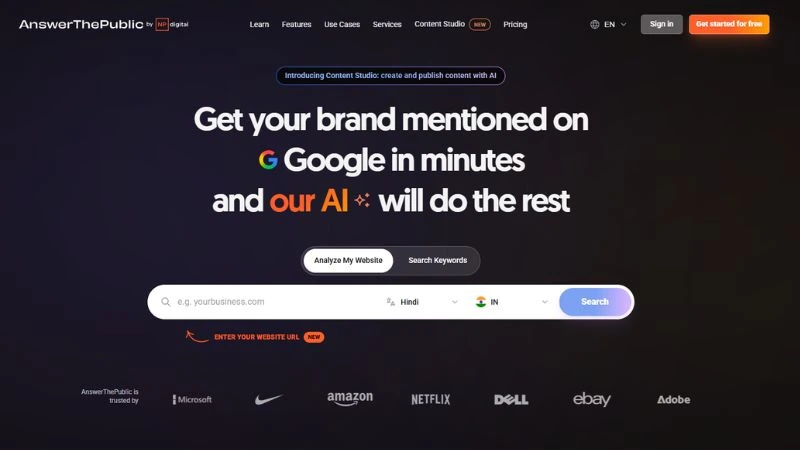
Go to answerthepublic.com. You can either type a topic or drop in your website URL to let their AI analyze your site.
The homepage presents two options: Search Keywords or Analyze My Website. The website analysis option is newer and powered by their Content Studio AI feature.
You can search by language and country, which is useful if you’re targeting regional audiences.
2. Get the Visual Search Cloud
After hitting search, the tool generates a visual “wheel” broken into categories:
- Questions: (who, what, where, when, why, how, are, can, will)
- Prepositions: (for, is, near, with, without, to, can)
- Comparisons: (vs, and, like, or)
- Alphabetical: (a to z variations)
- Related: (broader associated terms)
Each section branches out from your seed keyword like spokes on a wheel. Click any query and you can jump directly to a Google search for it.
3. Export the Data
Every result can be exported as a CSV. This is where you start doing serious content planning. Pull the CSV into Google Sheets, then cross-reference with SEMrush, Ahrefs, or Google Keyword Planner to append search volumes and difficulty scores.
Must read: Neil Patel’s Ad Secrets
Answer The Public Features: Free vs Pro
The free version gives you 1 search per day. That’s genuinely limited, but it’s enough to test the tool.
Answer The Public offers three paid plans: Starter, Growth, and Business. Pricing starts at just $6.66 per month (billed annually), making it one of the more affordable keyword research tools on the market.
The company positions itself as a budget-friendly alternative to platforms like Ahrefs, Semrush, and Moz, which can cost hundreds or even thousands of dollars per year. Instead of trying to be an all-in-one SEO suite, Answer The Public focuses on one thing: helping you discover what people are actually searching for.
As your needs grow, higher-tier plans unlock more searches, AI-generated articles, and additional team seats.
What Pro unlocks:
- More daily searches
- Search Volume data built directly into the tool
- CPC data per keyword
- Search Listening Alerts (get notified when new searches emerge around your keyword)
- CSV exports without limits
- Historical data to compare search behavior over time
- Content Studio with AI article generation (NEW feature)
The Search Listening Alerts feature is genuinely useful. Search data is a snapshot in time. What people searched last year is different from today. Alerts keep you updated when new question patterns appear around your topic.
Content Studio: The New AI Feature
Answer The Public recently launched Content Studio, their AI content generation tool. The pitch is bold: “Create months of content that ranks on Google and ChatGPT in less than 30 minutes.”
Here’s how it works:
- You enter your website URL
- Their AI analyzes your business
- It generates a business summary, suggests topics, and creates a content schedule
- You can customize your brand voice and image style
- Hit generate and get full articles, optimized for SEO and checked for plagiarism
The tool also claims that it gets your brand mentioned in Meta AI and Perplexity, two of the biggest AI search engines right now. That’s a GEO (Generative Engine Optimization) play, not just traditional SEO.
One user testimonial on their site: “This tool quite easily replaces the same work of 3 workers at a fraction of the price.”
Is it perfect? No AI tool is. But for bloggers and small business owners who struggle with content ideation, it’s a serious time-saver.
Also, read: Neil Patel’s Content Secrets
The Real Power: Search Listening Data Analysis
Traditional market research uses surveys and focus groups. They have a big flaw: people say what they think you want to hear.
Search engines are different. They’re a digital confessional. People ask Google things they’d never admit to their friends: financial worries, health fears, product frustrations, relationship problems.
Search listening means monitoring and interpreting organic search queries to understand genuine consumer behavior.
When you use Answer The Public for search listening, you’re not just collecting keywords. You’re reading human psychology at scale.
Here’s a concrete example. Say you run a SaaS product. Type your software category into Answer The Public. You might notice two dominant clusters:
- A huge block of “how to” questions (users need tutorials)
- An equally large block of “alternative to” and “vs” questions (users are actively comparing options)
That’s a content strategy insight right there. Your audience needs both educational content AND comparison content. Now you know exactly what to write.
How to Find Content Ideas With Answer The Public
This is where most people get the most immediate value from the tool.
Step 1: Use Specific Seed Keywords
Don’t just type “marketing.” Try “email marketing for restaurants” or “SEO for local businesses.” The more specific your seed, the more targeted the question cloud.
Step 2: Mine the Questions Wheel
The questions section is your goldmine. Here’s how to map intent to content format:
| Question Type | Best Content Format |
|---|---|
| Why questions | Educational blog posts, top-of-funnel |
| How questions | Step-by-step tutorials, video, infographics |
| Can/Are questions | FAQ sections, short social videos |
| What questions | Definition posts, beginner guides |
| Which questions | Comparison articles, best-of lists |
Step 3: Go Deep on Long-Tail Keywords
Long-tail keywords are three-plus-word phrases. Lower search volume, yes, but the conversion rate is dramatically higher because the intent is crystal clear.
Example: “running shoes” is a nightmare to rank for. But “how to clean running shoes without damaging them.” That’s a specific problem. Solve it well, and you’ve earned that reader’s trust. They’ll subscribe, share, and buy what you recommend.
Answer The Public generates hundreds of these long-tail variations automatically.
Step 4: Export and Prioritize
Pull the CSV. Cross it with SEMrush or Ahrefs. Sort by search volume and keyword difficulty. Now you have a prioritized content calendar, not just a random list of ideas.
Also, check: Neil Patel’s Hidden Keywords
Mapping Search Intent (and Why It Matters More Than Keywords)
Knowing what people search is only half the job. You need to know why they’re searching.
Send the wrong content type to the wrong intent, and you’ll either not rank, or you’ll rank and get demolished by a sky-high bounce rate.
Search intent breaks into four buckets:
Informational: The user wants to learn. (“What is Answer The Public?”)
Navigational: They want a specific site. (“Answer The Public login”)
Commercial Investigation: They’re comparing before buying. (“Answer The Public vs AlsoAsked”)
Transactional: They’re ready to act. (“Answer The Public pricing plans”)
Answer The Public’s Prepositions and Comparisons wheels are particularly useful for this.
- Prepositions: (for, with, without, near) often reveal informational or transactional intent
- Comparisons: (vs, or, like) are almost always commercial investigations
When someone searches “Answer The Public vs SEMrush,” they’ve already decided they need a tool. They just need one final piece of data to choose. Write that comparison, nail the answer, and you get the click, and probably the conversion.
Semantic SEO Strategy: Building Topical Authority
Google has evolved. It no longer just matches keywords. It understands meaning, context, and relationships between topics.
To rank well today, you need to prove you’re a comprehensive authority on a subject, not just a site that mentions a keyword a few times.
Answer The Public is the perfect tool for this.
Also, check: Neil Patel’s SEO Secrets – Deep Research
Build a Topic Cluster, Not Just One Article
Here’s the framework:
Step 1: Pillar Page: Create a broad, comprehensive overview of your core topic. If your topic is “Answer The Public,” your pillar page covers what it is, how it works, pricing, use cases, and alternatives.
Step 2: Spoke Content: Pull the specific, nuanced questions from Answer The Public’s question wheel. These become individual cluster articles. For example:
- “How to use Answer The Public for keyword research”
- “What is Answer The Public alternative?”
- “How much does Answer The Public cost?”
- “How does Answer The Public work?”
Step 3: Interlink Everything: Link spoke articles back to the pillar page. Link the pillar out to the spokes. This internal linking structure signals to Google that your site owns this topic.
When you own the topic cluster, individual pages rank better because the whole site carries topical authority, not just the one page.
Optimize for Featured Snippets
Answer The Public gives you the exact questions people are asking. That means you’re perfectly positioned to win Position Zero.
To target a Featured Snippet:
- Use the exact question as an H2 or H3 heading
- Provide a direct, clear answer in 40-60 words immediately below that heading
- Then elaborate with examples, context, and data
Don’t bury the answer. Google wants the answer fast. So does the user.
Add FAQ Schema
Take 8-10 questions from Answer The Public and embed them as a proper FAQ section at the bottom of your article. Then, apply the FAQ Schema markup through Yoast or Rank Math (one click).
When it works, those questions appear directly beneath your search listing, pushing competitors down the page and significantly lifting your CTR.
Content Gap Analysis: Finding What You’re Missing
Even solid content strategies have blind spots.
Here’s a simple content gap process using Answer The Public:
Step 1: Self-Audit: Export the CSV for your top industry keywords. Compare every query against your existing content. Highlight the questions you’ve never answered.
Step 2: Competitor Check: Take those unanswered questions and Google them. Who’s ranking? Are competitors giving good answers? If yes, you need to create something significantly better. If nobody’s giving a great answer, you just found a gap worth filling.
Step 3: Prioritize by Search Volume: The free version shows questions but not search volumes. The Pro version integrates this data directly. Alternatively, export the CSV and run it through Google Keyword Planner or SEMrush to append volume data.
Prioritize the gaps with the highest volume and lowest competition first.
Beyond SEO: Other Smart Uses of Answer The Public
Most people think of this as an SEO tool. That’s underselling it.
Product Development
Before you build a new product, run your core concept through Answer The Public. Say you’re launching a vegan protein powder. The tool might surface:
- “Vegan protein powder without stevia”
- “Vegan protein powder that doesn’t cause bloating”
- “Best vegan protein powder for baking”
These aren’t just content ideas. They’re product features. The search data is telling you exactly what consumers hate about current products and what alternate uses they’re imagining.
Sales and Objection Handling
Your sales team spends hours guessing what objections prospects will raise. Answer The Public shows them in black and white.
If people are searching “why is [your service] so expensive” or “[your product] vs [cheaper competitor],” those are live objections. Build scripts, email sequences, and landing pages that address them head-on.
Customer Support Optimization
Run your brand name through the tool. You’ll see the technical and support questions people are asking Google instead of contacting your help desk.
Build a knowledge base that answers these. Your support ticket volume drops. Customers find answers faster. Everyone wins.
Answer The Public Services: NP Digital Agency
Answer The Public isn’t just a tool anymore. Under the Services section, it’s now a full digital marketing agency offering:
Earned Media: SEO, Content Marketing, Digital PR, AI Search Optimization, App Store Optimization, Influencer Marketing, Organic Social Media, Email Marketing
Paid Media: Media Strategy, Paid Search, Paid Social, Programmatic and Display, Marketplaces, Streaming
Data Analytics: Dashboard Development, UX, Front End Development, Conversion Rate Optimization, Ad Operations
Creative: Performance Creative, Branding, Content Production, Website Design, Graphic and Motion Design, Audio Production
Technology: NP Digital (their full-service agency), Ubersuggest (their free keyword research Chrome extension)
The “Book a Call” CTA appears throughout the services section. This is clearly a lead generation funnel for Neil Patel’s broader agency business.
Learning Resources on Answer The Public
The Learn section includes:
- Free Market Research: downloadable insights
- Video Course: Master AnswerThePublic: full course from Search Listening’s co-founder
- Search Listening for Public Relations: targeted at PR professionals
- Webinars: regular sessions on reading consumer behavior
- Search Listening and the Consumer Journey: adapted from their on-site training
- Ebook: Consumer Insights in the Age of Google
- FAQs (currently only available in English)
If you’re new to search listening as a concept, the free resources are worth bookmarking.
Alternatives to Answer The Public
Answer The Public is the most recognized tool in this space, but it’s smart to know your options:
| Tool | Data Source | Best For |
|---|---|---|
| AlsoAsked | Google’s “People Also Ask” boxes | Mapping question relationships, article subheadings |
| Keyword Tool (KeywordTool.io) | Autocomplete from Google, YouTube, Amazon, Instagram | E-commerce, video content research |
| Exploding Topics | Trend pattern analysis | Finding low-competition topics before they spike |
| Google Trends | Google’s historical search data | Seasonality, geographic popularity, topic trajectory |
| Ubersuggest | Google keyword data + competition | Free SEO tool with monthly search volume and CPC |
Each tool has a different data source. Answer The Public scrapes autocomplete. AlsoAsked maps PAA relationships. Google Trends shows seasonal patterns. Combine two or three for a more complete picture.
Who Uses Answer The Public? (Use Cases)
From the site’s own Use Cases section:
SEO: Improve online visibility and boost rankings by knowing exactly what questions to answer
Paid Media: Find search intent data to build more targeted ad campaigns
Content Marketing: Build a content calendar based on real consumer questions, not guesswork
Consumer Research: Understand what your market is thinking before launching products
Public Relations: Find the angles journalists and consumers care about, then craft PR pitches around them
The tool has 1.1 million+ users according to their site, with brands like Adobe, Microsoft, Nike, Amazon, Netflix, Dell, and eBay listed as trust signals.
Answer The Public Pricing: What Does It Actually Cost?
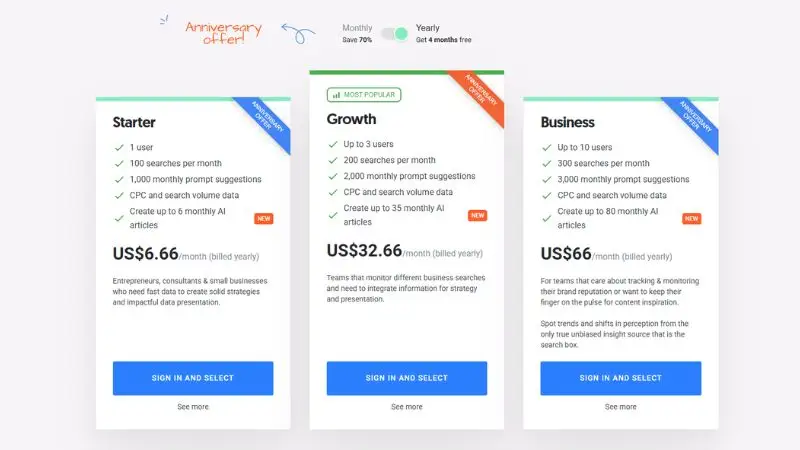
PlanAnswer The Public keeps things surprisingly affordable, especially when compared to expensive all-in-one SEO suites. It offers three plans based on your monthly search needs, AI article generation limits, and team size.
Here’s a quick breakdown:
| Plan | Price (Billed Yearly) | Users | Monthly Searches | AI Articles |
|---|---|---|---|---|
| Starter | $6.66/month | 1 | 100 | 6 |
| Growth ⭐ | $32.66/month | Up to 3 | 200 | 35 |
| Business | $66/month | Up to 10 | 300 | 80 |
All plans include CPC and search volume data. There’s also a 7-day trial if you’d like to test the platform before committing.
For most bloggers and niche site owners, the Starter plan is more than enough. But if you’re managing multiple websites or working with a team, the Growth plan offers the best balance between price and features.
AnswerThePublic Pros and Cons 2026
Pros
- Finds questions you’d never think of — pulls real “how, why, what, can” queries straight from search behavior
- Visual format speeds up brainstorming — scan the question map, pick angles, done in minutes
- Great for FAQ and H2 content — questions translate directly into headings
- Easy export — CSV or image, ready to share with a writer or client
Cons
- Free plan is too limited — barely enough searches for one real session
- No filters — can’t exclude junk or niche-irrelevant terms, you sort manually
- Data gets noisy for narrow niches — works best for broad, high-volume topics
- Not a full keyword tool — no real volume or competition data, so you still need Ahrefs or SEMrush to validate
Common Mistakes to Avoid
1. Using only broad seed keywords: “Marketing” will give you generic noise. “WhatsApp marketing for restaurants” gives you actionable insights.
2. Ignoring the Comparisons wheel: This is where commercial intent hides. “Answer The Public vs [competitor]” queries are from buyers, not browsers.
3. Not cross-referencing search volume: A question being popular on Answer The Public doesn’t always mean it has meaningful search volume. Verify in a dedicated keyword tool before spending time writing.
4. Writing only pillar content: One big article won’t build topical authority. You need the cluster, with multiple spoke articles interlinked with the pillar.
5. Forgetting to update: Search listening data is a snapshot in time. Set up Alerts (Pro feature) or revisit your seed keywords quarterly to catch new question patterns.
FAQs
Q: Is Answer The Public free?
Yes, the free version gives you 1 search per day with limited data. Paid plans unlock more searches, search volume data, alerts, and Content Studio.
Q: Who owns Answer The Public?
It’s owned by NP Digital, Neil Patel’s digital marketing company. Neil Patel acquired it and relaunched it with significantly expanded features.
Q: How is Answer The Public different from Google Keyword Planner?
Google Keyword Planner shows search volumes for specific terms. Answer The Public shows the actual question formats people type, full phrases, and sentences. They complement each other rather than replace each other.
Q: Can Answer The Public replace SEMrush or Ahrefs?
Not entirely. SEMrush and Ahrefs offer backlink analysis, site audits, rank tracking, and competitive research. Answer The Public specializes in search listening and question discovery. Use them together.
Q: What is Content Studio on Answer The Public?
It’s a newer AI feature that analyzes your website URL and generates full articles automatically, optimized for SEO and brand voice. It also aims to get your content mentioned in AI search engines like Perplexity and Meta AI.
Q: Is Answer The Public good for local SEO?
Yes. You can filter searches by country and language. For local businesses, this helps you understand exactly what questions your local audience is asking.
Q: How often should I use Answer The Public?
For active content creators: once a month minimum per core topic. Use Alerts (Pro) to get notified of new search patterns between manual searches.