Most Hostinger Web Hosting reviews make one mistake. They focus on features instead of limitations.
You’ll see endless praise about NVMe storage, free domains, AI tools, and promotional pricing. What you rarely see is how resource limits, renewal costs, and plan restrictions affect real websites once traffic starts growing.
In this Hostinger Web Hosting review, we’re taking a different approach.
Instead of repeating marketing claims, we’ll break down each plan, explain who should buy it, who should skip it, and highlight the trade-offs that most reviews ignore.
By the end of this guide, you’ll know exactly which Hostinger plan fits your website, budget, and growth goals without paying for resources you don’t actually need.
Quick Verdict
If you need an immediate recommendation without diving into the technical specifications, here is our definitive breakdown of Hostinger’s core lineup:
- Best Overall Plan: Business Web Hosting. It offers the ideal balance of hardware speed, solid-state storage, and automated safety features for growing digital properties.
- Best for Beginners: Premium Web Hosting. A cost-effective entry point for individuals learning the ropes of site deployment, basic configuration, and portfolio building.
- Best for Bloggers: Business Web Hosting. The inclusion of a customized content delivery network and daily automated rollbacks makes it essential for protecting and scaling content sites.
- Best for Small Business: Business Web Hosting. It delivers professional email access, e-commerce resources, and superior processing power required to handle consistent customer interactions.
- Best Value for Money: Business Web Hosting. For a small price jump over the baseline tier, you gain NVMe drive infrastructure, significantly higher file limits, and superior handling of concurrent server traffic.
Also, check: Launch Your Blog in Minutes
Hostinger Plans Compared
To understand what you are paying for, you need to look past generic marketing labels and analyze the underlying resource allocations. The table below outlines the core metrics across the primary hosting tiers:
| Feature / Metric | Premium Web Hosting | Business Web Hosting | Cloud Startup |
| Websites Supported | Up to 3 | Up to 50 | Up to 100 |
| Storage Architecture | 20 GB Standard SSD | 50 GB High-Speed NVMe | 100 GB High-Speed NVMe |
| Visits Monthly (Est.) | ~25,000 | ~100,000 | ~200,000 |
| Backup Frequency | Weekly Automated | Daily + On-Demand | Daily + On-Demand |
| Free Domain (1 Year) | Included | Included | Included |
| Performance Resource | 1 GB RAM / 1 CPU Core | 1.5 GB RAM / 1 CPU Core | 4 GB RAM / 2 CPU Cores |
| PHP Workers | 20 | 40 | 100 |
| Inodes (File Limit) | 400,000 | 600,000 | 2,000,000 |
| AI Feature Suite | Basic Tools | Full WordPress AI Agent | Full WordPress AI Agent |
| Value Score | 7.5 / 10 | 9.5 / 10 | 8.5 / 10 |
| Ideal User Profile | Hobbyists & Testers | Professional Bloggers & SMBs | Agencies & High-Traffic Stores |
My Recommendation After Analyzing All Plans
After comparing all three Hostinger plans, here’s my take.
Premium Web Hosting is a good starting point for beginners, personal websites, and small blogs with limited traffic. If your budget is tight and you’re just getting started, it gets the job done.
Business Web Hosting is the plan I’d recommend to most people. You get faster NVMe storage, daily backups, a built-in CDN, and support for higher traffic levels. For bloggers, affiliate marketers, freelancers, and small businesses, this is the sweet spot between price and performance.
Cloud Startup is designed for websites that are already generating serious traffic or running resource-heavy projects. If you’re managing a growing eCommerce store, a large content site, or multiple high-traffic websites, the extra resources can be worth the investment.
For the average website owner, Business Web Hosting offers the best overall value. It gives you room to grow without paying Cloud Hosting prices, which is why it’s the plan I’d personally choose.
Exclusive Hostinger Discount (2026)
Choosing the right hosting environment is much easier when you can lock in premium performance without breaking your budget. By using my exclusive referral links below, you will receive an additional 20% discount applied directly to your cart at checkout.
Choose Your Growth Path
Select the tier that aligns with your current traffic, storage needs, and professional goals:
1. Premium Web Hosting
- The Entry-Level Sweet Spot: Ideal for beginners, personal portfolios, and testing new concepts.
- Core Capacity: Deploy up to 3 distinct websites with 20 GB of standard solid-state storage.
- Get Your Discount: Click here to claim 20% off Premium Hosting
2. Business Web Hosting
- The Performance Standard: Built for growing blogs, dynamic affiliate sites, and small businesses.
- Advanced Infrastructure: Host up to 50 websites on ultra-fast, high-capacity 50 GB NVMe storage drives.
- Get Your Discount: Click here to claim 20% off Business Hosting
3. Cloud Startup
- The Enterprise Bridge: Tailored for online stores, agencies, and high-traffic applications requiring dedicated resources.
- Maximum Compute Power: Scale up to 100 websites with 100 GB NVMe storage, 4 GB of dedicated RAM, and 2 CPU cores.
- Get Your Discount: Click here to claim 20% off Cloud Startup
Disclosure: If you purchase Hostinger through links on this page, you may receive an exclusive discount. I may earn a small affiliate commission at no extra cost to you. This helps support the site and allows me to keep publishing free content and reviews.
Premium Web Hosting Review
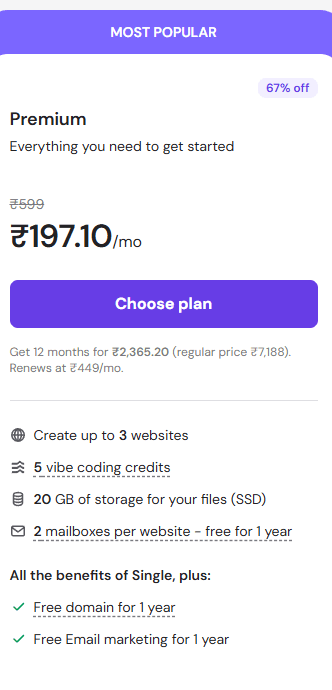
The Premium plan is Hostinger’s high-volume entry tier. It is heavily marketed to beginners due to its low entry price, but it comes with distinct engineering boundaries that you must understand before buying.
Pros
- Highly Economical: The long-term introductory pricing is one of the lowest entry barriers in the hosting market.
- Essential Inclusions: You still get a free domain registration for the first year, unmetered bandwidth, and standard security certificates.
- Custom Control Panel: Access to hPanel makes managing your files, database setups, and basic email configurations intuitive.
Cons
- Hardware Speed Restrictions: This plan relies on standard SSD storage rather than modern NVMe drives, resulting in slower database query executions.
- Data Vulnerability: You only get weekly automated backups, making it poorly suited for dynamic sites that change frequently.
- Strict Resource Ceilings: With only 1 GB of RAM and 20 PHP workers, the server will struggle if multiple plugins run heavy background processes simultaneously.
Also, check: Essential WordPress Plugins for Beginners (Updated Guide 2026)
Who Should Buy
This tier is best for student portfolios, local community bulletin boards, staging sites for client previews, and individuals testing out basic web concepts for the first time.
Who Should Avoid
Skip this plan if you intend to run an online store, a busy forum, an affiliate site with dozens of plugins, or any business asset where downtime or slow loading directly hurts your income.
Real Use Case
Imagine deploying a simple three-page digital portfolio for a local service provider. The site uses a clean layout, a basic contact form, and receives minimal traffic. In this scenario, the Premium plan works perfectly fine. It keeps operational overhead low while delivering consistent uptime for low-volume visits.
Business Web Hosting Review
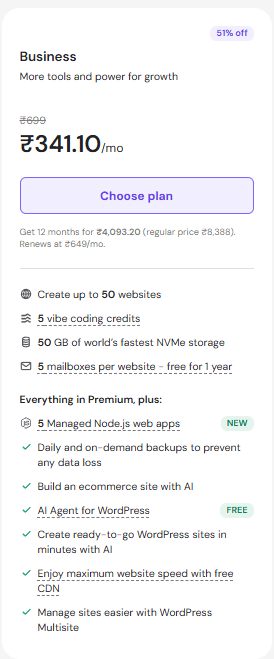
The Business tier represents the balanced center of Hostinger’s shared infrastructure. It scales up the core compute metrics to provide stable execution for production-ready websites.
Pros
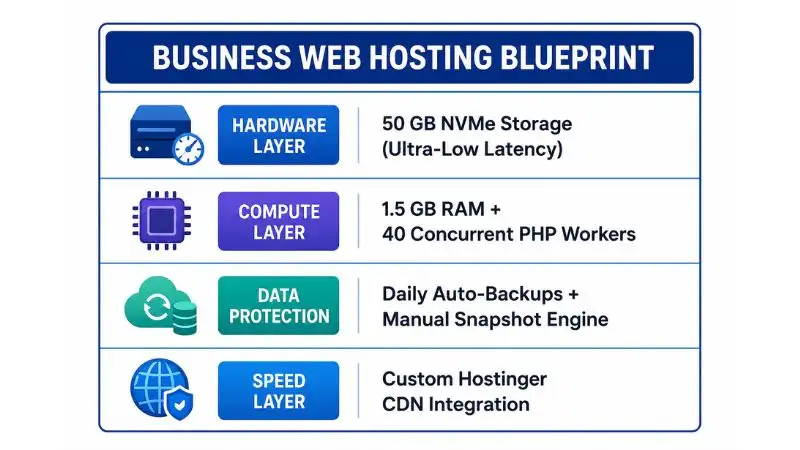
- NVMe Storage Engine: Upgrading to NVMe drives drastically accelerates database performance, which cuts down page generation times for content management systems.
- Daily Rollback Points: Automated daily backups combined with a manual snapshot engine ensure you can revert your site immediately if an update breaks your configuration.
- Higher Concurrent Limits: The jump to 40 PHP workers enables the server to process complex assets, checkout requests, and traffic spikes efficiently.
Cons
- Shared Environment Limits: While it is powerful, you are still sharing a server slice with other accounts. It cannot handle sustained enterprise-grade traffic loads.
- Higher Renewal Rates: The step up in price upon renewal requires your asset to generate enough revenue to absorb the increased operational cost.
Performance Benefits
The core advantage here is the removal of typical hosting bottlenecks. By pairing NVMe storage with a tailored content delivery network, the server processes database tables with minimal lag. This is critical for modern content management systems, where every page load requires real-time database queries to assemble the layout for your readers.
Best Use Cases
This plan is ideal for professional content creators, corporate business frontages, local directory sites, niche affiliate review portals, and early-stage e-commerce setups with concise catalogs.
Also, read: Why 90% Bloggers Fail at Choosing a Niche (Fix It)
Cloud Startup Review
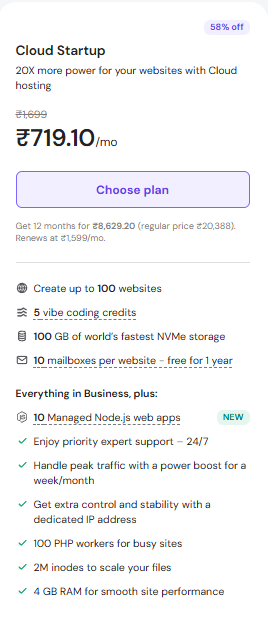
The Cloud Startup plan moves your data off standard shared server configurations and places it into an isolated virtual cloud environment. This tier bridges the gap between simple shared hosting and complex virtual private servers.
Pros
- Dedicated Hardware Allocation: You get 4 GB of RAM and 2 dedicated CPU cores that belong exclusively to your account. Your site’s performance cannot be degraded by neighboring accounts.
- Massive PHP Capacity: With 100 PHP workers available, the platform can handle complex themes, heavy script loads, and continuous dynamic actions simultaneously.
- Priority Support Routing: Support requests bypass standard queues, connecting you directly to senior technical personnel for faster resolutions.
Also, check: Best Lightweight WordPress Themes for Faster Websites
Cons
- Significant Cost Increase: The monthly financial commitment is substantially higher than the shared tiers, which might be hard for lean businesses to justify.
- Overkill for Static Content: If your site consists primarily of informational text and image galleries, you are paying for computing power that will sit idle.
Who Needs It
This plan is built for active online stores running multiple transactions hourly, corporate sites with large marketing budgets, membership forums with high numbers of logged-in users, and digital agencies managing up to 100 client sites.
When It’s Overkill
If your platform relies heavily on page caching and receives steady, predictable reading traffic without processing massive amounts of user-generated actions, the Business tier will achieve the exact same user-facing speed for a fraction of the cost.
Also, check: How to Choose the Best WordPress Hosting
Hostinger Web Hosting Performance Analysis
When evaluating hosting performance, ignore vague promises like “99.9% uptime.” Instead, let’s analyze how Hostinger’s specific backend stack affects your Core Web Vitals and site speed.
Speed Architecture
Hostinger runs its infrastructure on LiteSpeed Web Server rather than traditional Apache setups. LiteSpeed is built to handle high volume with minimal memory usage. When paired with the LiteSpeed Cache (LSCache) plugin on your site, page layouts are pre-built and saved directly in the server’s memory. This lets the server deliver pages to visitors instantly without forcing your system to query the database for every single visit.
NVMe Drive Arrays
The Business and Cloud tiers use NVMe (Non-Volatile Memory Express) storage protocols. Traditional solid-state drives communicate through legacy interfaces designed for older spinning hard drives. NVMe connects directly to the server’s main processing unit via the high-speed PCIe lanes. This setup drops database read and write latency to a fraction of a millisecond, accelerating asset execution across your entire media library.
Caching and Content Delivery
Hostinger includes an integrated, custom Content Delivery Network (CDN) starting at the Business tier. This network mirrors your static assets (images, style sheets, script files) across servers worldwide. When a reader requests a page, these assets load from the nearest geographic node rather than pulling from your primary server location. This reduces network transit lag and lowers your Time to First Byte (TTFB) significantly.
Hostinger Features That Actually Matter
Let’s strip away the marketing buzzwords and examine the core features that affect your day-to-day operations.
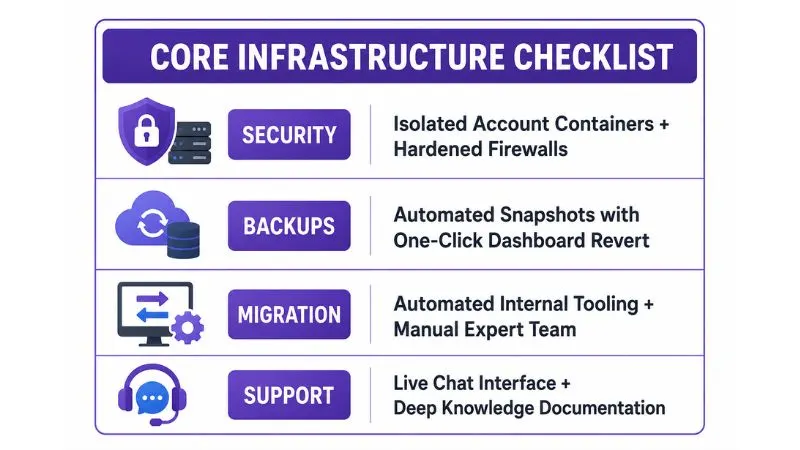
Security Management
Hostinger places each account into an isolated container using kernel-level virtualization. If another user’s site on the same physical server gets compromised, the threat is completely contained and cannot move over to infect your directories. This layer is supported by automated firewalls and real-time malware scanners that check your uploads continuously.
Automated Backups
The daily backup engine on the Business tier is a critical operational safety net. The system retains multiple historical restore points. If an automated script update breaks your theme layout or corrupts your database files, you can log into hPanel and run a full restore with one click. This returns your entire digital environment to an operational state within minutes.
Site Migrations
Moving an existing site manually can be a major headache for beginners. Hostinger simplifies this with an automated migration tool built into their dashboard. You simply enter your old host’s login details, and their system copies your files over in the background. If your configuration is complex or non-standard, their technical support team will step in and complete the transfer manually at no extra cost.
Support Realities
Hostinger does not offer phone support. Their entire customer care operation runs through 24/7 live chat and email ticket queues. The live chat system uses an AI assistant named Kodee to handle basic troubleshooting, guide you to documentation, or adjust simple account settings. If your issue is complex, you can easily bypass the bot to speak with a human agent. Response times are generally under five minutes, but during peak usage windows, you may experience brief delays.
What Most Reviews Don’t Tell You
To maintain real transparency, we need to talk about the hidden terms, upsells, and operational limitations that affiliate reviews usually gloss over.
The Promotional Pricing Catch
The low prices shown on Hostinger’s checkout page require a 48-month commitment paid upfront. If you prefer to sign up for a shorter 12-month contract, the monthly rate increases noticeably. You need to factor in this upfront investment and realize that you are locking into a platform for multiple years to secure the best possible value.
Renewal Pricing Escalation
When your introductory contract ends, your plan will renew at standard market rates. For example, a shared plan that costs a few dollars a month initially can jump significantly upon renewal. This is a standard industry practice across almost all hosting providers, but you must budget for this price step-up in your long-term business plan.
Inode and File Restraints
“Unlimited storage” or “generous disk space” is always governed by an Inode limit. An inode represents a single individual file, directory, or email file stored on your account. The Premium plan caps your environment at 400,000 inodes, while the Business plan allows 600,000. If you run a large site with thousands of unoptimized media uploads, or let your uncleaned email mailboxes pile up, you can hit this file limit long before you run out of actual storage space.
Hostinger vs Competitors
Evaluating Hostinger requires comparing its technical structure against other major providers in the hosting landscape.
Hostinger vs Bluehost
Bluehost uses a standard Apache configuration and relies heavily on traditional cPanel setups. Hostinger’s custom hPanel interface is much more modern and less cluttered. In terms of raw performance, Hostinger’s LiteSpeed infrastructure regularly beats Bluehost’s standard setup for page load speeds and database execution times, especially on entry-level plans.
Hostinger vs SiteGround
SiteGround offers excellent performance and highly knowledgeable support, but their pricing is considerably higher. They also enforce strict monthly visitor caps across their entire lineup. Hostinger is much easier on your budget, making it the better choice for cost-conscious creators, while SiteGround targets premium buyers who are willing to pay a luxury price for phone access and advanced developer tools.
Hostinger vs Namecheap
Namecheap is a fantastic domain registrar, but their hosting options are quite basic. Their servers use older drive architectures that can struggle under heavy traffic loads. Hostinger provides a much more robust platform for content platforms like WordPress, offering superior caching tools, modern NVMe drive speeds, and better global server coverage.
Infrastructure Comparison Table
| Metric / Feature | Hostinger (Business) | Bluehost (Choice Plus) | SiteGround (GrowBig) | Namecheap (Stellar Plus) | Cloudways (Entry Tier) |
| Server Engine | LiteSpeed | Apache / Nginx | Custom Nginx Stack | Apache | Hybrid Nginx/Apache |
| Storage Technology | High-Speed NVMe | Standard SSD | Premium SSD | Standard SSD | Cloud NVMe Arrays |
| Control Interface | Custom hPanel | Standard cPanel | Custom Site Tools | Legacy cPanel | Cloudways Platform |
| Caching Layer | LSCache Built-In | Basic Plugin | SuperCacher Engine | Basic Configuration | Breeze Cache Engine |
| Pricing Tier | Very Economical | Moderate | Premium Cost | Budget Entry | Premium Pay-As-You-Go |
Real Scenarios
Let’s look at how these technical specifications apply to real-world business scenarios so you can make the right call.
Scenario 1: The New Blogger
You are launching a personal review site focused on local trends. You project fewer than 15,000 readers a month for your first year, and your content will be mostly text and optimized images.
- The Right Choice: Premium Web Hosting. It offers a low cost of entry while giving you a secure, functional environment to build your audience and learn the technical basics without overspending.
Scenario 2: Niche Affiliate Site
You are deploying an authority platform with over 150 detailed product reviews. You rely heavily on multiple data table plugins, complex visual elements, and track conversion scripts running sitewide.
- The Right Choice: Business Web Hosting. The fast processing times of NVMe storage and the security of daily automated backups are essential here. This setup ensures your pages load quickly so you don’t lose valuable affiliate clicks.
Scenario 3: The Independent Digital Agency
You manage a small web studio and need to host 25 informational websites for local business clients. You need separate account environments, staging areas to preview changes, and priority support when dealing with live client updates.
- The Right Choice: Cloud Startup. The 4 GB of isolated memory and dedicated CPU cores ensure one client’s traffic spike won’t slow down your other clients’ sites. Plus, the priority support queue helps you resolve client issues fast.
Scenario 4: The Local Small Business
You run an established retail store or professional services business. Your site handles customer inquiries, hosts service portfolios, and runs an online calendar for booking appointments.
- The Right Choice: Business Web Hosting. This plan gives you the hardware resources needed to process form submissions smoothly, along with professional business email matching your domain to keep your client communication looking polished.
Should You Use My Referral Link?
Let’s talk openly about how this content is funded. If you decide to purchase a hosting plan through the links provided throughout this guide, I will earn an affiliate commission from Hostinger.
Here is what that means for you:
- You Save Money: Clicking my link applies a special promotional discount code to your cart automatically, lowering your upfront cost.
- Zero Extra Cost: The commission comes directly out of Hostinger’s marketing budget. Your checkout price does not increase by a single cent.
- Support for Real Testing: These commissions allow me to purchase hosting accounts, run performance tests, and write honest, comprehensive guides without relying on corporate sponsorships.
I only recommend infrastructure that I have thoroughly analyzed and tested. If you find this unbiased breakdown helpful for your business, using my referral link is an easy way to support independent, data-backed tech reviews while saving money on your purchase.
Final Verdict
After reviewing the available plans, Hostinger Web Hosting delivers a strong mix of performance, features, and affordability for most website owners.
Best Value Plan: The Business Web Hosting plan is the clear winner for most users. With NVMe storage, daily backups, a built-in CDN, and higher resource limits, it offers a noticeable upgrade over the Premium plan without a major jump in cost.
Who Should Skip Hostinger: If you’re running a large enterprise website, need advanced server customization, or require premium managed hosting support, Hostinger Web Hosting may not be the best fit. In that case, providers like Cloudways or Kinsta may be worth considering.
Who Should Buy Hostinger: Bloggers, affiliate marketers, freelancers, and small business owners will get the most value from Hostinger Web Hosting. The Business plan offers the best balance of price, performance, and scalability, making it the option I’d recommend for most websites.
If you’re looking for fast, reliable, and budget-friendly hosting, Hostinger Web Hosting remains one of the strongest choices available today.
FAQ Section
1. Does Hostinger provide standard cPanel access with their plans?
No. Hostinger uses their own custom-built control panel called hPanel. It includes all the standard configuration options you find in cPanel, like database management, domain routing, file directories, and email setup, but features a much cleaner, more modern layout that is significantly easier for beginners to navigate.
2. What exactly happens when my initial 48-month introductory contract expires?
When your initial promotional contract ends, your plan will automatically renew at Hostinger’s standard ongoing renewal rate. This renewal price is higher than the introductory rate you pay at checkout. You can check the current renewal pricing directly on the hPanel billing dashboard before your contract updates.
3. Can I upgrade my shared hosting tier later if my traffic grows?
Yes. Hostinger makes it simple to upgrade your plan at any point right from your hPanel account dashboard. Their system migrates your site files to the new tier automatically with zero downtime, charging you only a prorated fee for the difference in server resources.
4. Is the free domain registration valid for the entire life of my account?
No. The free domain promotion covers the registration fee for the first year only. After your first 12 months, your domain name will renew annually at standard registration rates, which vary depending on your extension (like .com, .net, or .org).
5. How does the 30-day money-back guarantee handle domain name fees?
If you request a refund within the first 30 days, Hostinger returns 100% of your hosting plan fees. However, domain registration fees are non-refundable. Hostinger deducts the cost of the domain from your refund, and you retain full ownership of your domain name to use with any other host.
6. Do I really need to purchase the Cloud Startup plan to run an online store?
No. You can easily launch an early-stage e-commerce store using the Business Web Hosting tier. It handles standard WooCommerce setups and payment gateways smoothly. You only need to upgrade to Cloud Startup once your store carries hundreds of products and processes multiple customer transactions every hour.
7. What is an Inode limit, and why should I care about it?
An Inode represents a single file, folder, database entry, or email stored on your server. Hosts limit the total number of inodes to keep servers stable. If you let uncompressed media assets or uncleaned spam folders pile up, you can hit your plan’s Inode limit even if you still have plenty of actual disk storage left.
8. Does Hostinger offer real human customer support over the phone?
No. Hostinger manages all customer support requests through 24/7 live chat and email support tickets. They do not have a customer service phone line. You can access the live chat option anytime through your hPanel dashboard to speak with a human support technician.
9. Is Hostinger’s built-in email service free to use for my business?
Yes. Every core plan allows you to create free professional email addresses matching your domain name. However, if you need advanced features, larger mailboxes, or deep integrations with enterprise workspaces, Hostinger offers premium business email upgrades as paid add-ons.
10. Can I host Node.js web applications on Hostinger’s shared plans?
Node.js web application management is supported starting on the Business Web Hosting plan, which allows you to run up to 5 managed Node.js applications. The Premium plan does not support Node.js apps, so you would need to look at the Business tier or a VPS setup.
11. Does Hostinger handle automated core updates for my WordPress site?
Yes. Hostinger includes managed WordPress automation across all their tiers. The system handles core platform updates and security patches automatically in the background, keeping your installation safe without requiring manual maintenance.
12. Are there any hidden setup fees added to my cart at checkout?
No. Hostinger does not charge any hidden activation or setup fees when you choose an annual or multi-year plan. The price you see on the final checkout screen represents the total cost of your server resources for the duration of your contract.
13. Can I migrate a website from another host myself using hPanel?
Yes. Hostinger has an automated migration assistant built directly into the hPanel dashboard. You simply enter your old host’s login details, and the migration tool copies your entire file directory and database over automatically in the background.
14. What makes NVMe storage better than standard SSD drives?
NVMe drives connect directly to your server’s processor using high-speed PCIe lanes, bypassing legacy data interfaces. This results in much faster read and write speeds, allowing your server to process database queries and load complex web pages much faster than traditional SSD configurations.
15. Do I need to buy a separate SSL security certificate for my domain?
No. Hostinger includes free, unlimited Let’s Encrypt SSL certificates with all of their plans. The installation process is completely automated through the control panel, securing your site’s data and keeping your visitor traffic encrypted automatically.