
Key Takeaways
- Architectural Difference: In the Kinsta vs Bluehost debate, the biggest difference is infrastructure. Kinsta isolates your website inside its own dedicated cloud container, while Bluehost places your site alongside hundreds of other accounts on a shared server.
- Pricing Models: Bluehost uses low introductory pricing that increases significantly at renewal. Kinsta charges a higher but predictable monthly fee with core performance features included.
- Support Response: Kinsta provides direct access to specialized WordPress engineers, while Bluehost relies on traditional support queues and scripted troubleshooting.
- Target Focus: When comparing Kinsta vs Bluehost, the target audience is completely different. Kinsta is built for agencies, ecommerce stores, and high-traffic websites, while Bluehost focuses on beginners, hobby blogs, and small business websites.
Choosing between Kinsta and Bluehost is not a standard head-to-head comparison. It is a fundamental misunderstanding of web hosting architecture.
Most online reviews treat this matchup like a normal product comparison, using basic checklists and feature tables. That approach misses the entire point.
These two platforms operate on entirely different structural levels. One is an entry-level shared hosting service designed for cost efficiency. The other is an isolated cloud infrastructure engineered for performance stability.
Before we compare Bluehost vs Kinsta in detail, a quick disclosure.
Affiliate Disclosure: I may earn a commission from qualifying purchases made through links on this website, at no additional cost to you.
What Is Kinsta?
Kinsta is a premium managed WordPress hosting provider built for speed, security, and performance. Unlike traditional shared hosting companies, Kinsta runs on the Google Cloud Platform and is designed specifically for WordPress websites.
Kinsta handles technical tasks such as server optimization, backups, caching, security monitoring, and performance tuning, allowing website owners to focus on content and growth. It’s a popular choice among businesses, agencies, ecommerce stores, and high-traffic websites that need reliable performance without managing server infrastructure themselves.

What Is Bluehost?
Bluehost is a web hosting company that helps individuals and businesses get their websites online. It’s one of the most popular hosting providers for beginners because it offers affordable plans, a simple setup process, and a user-friendly control panel.
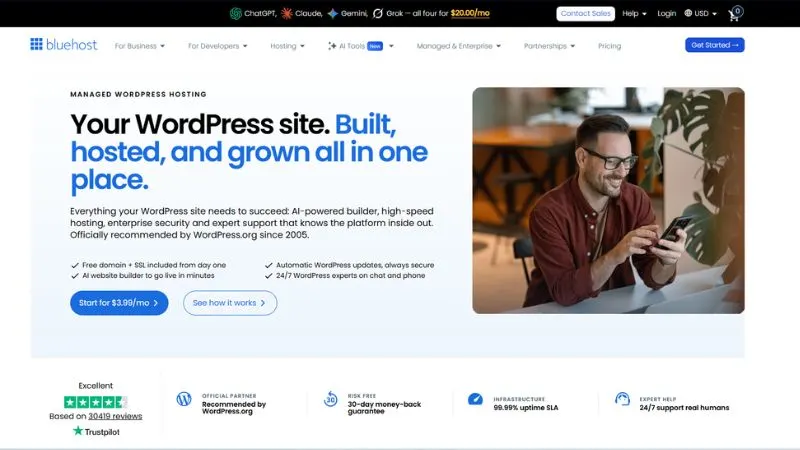
Many first-time website owners choose Bluehost because it includes essentials like a free domain for the first year, email hosting, SSL certificates, and one-click WordPress installation. If you’re launching your first blog, portfolio, or small business website, Bluehost is often seen as an easy starting point.
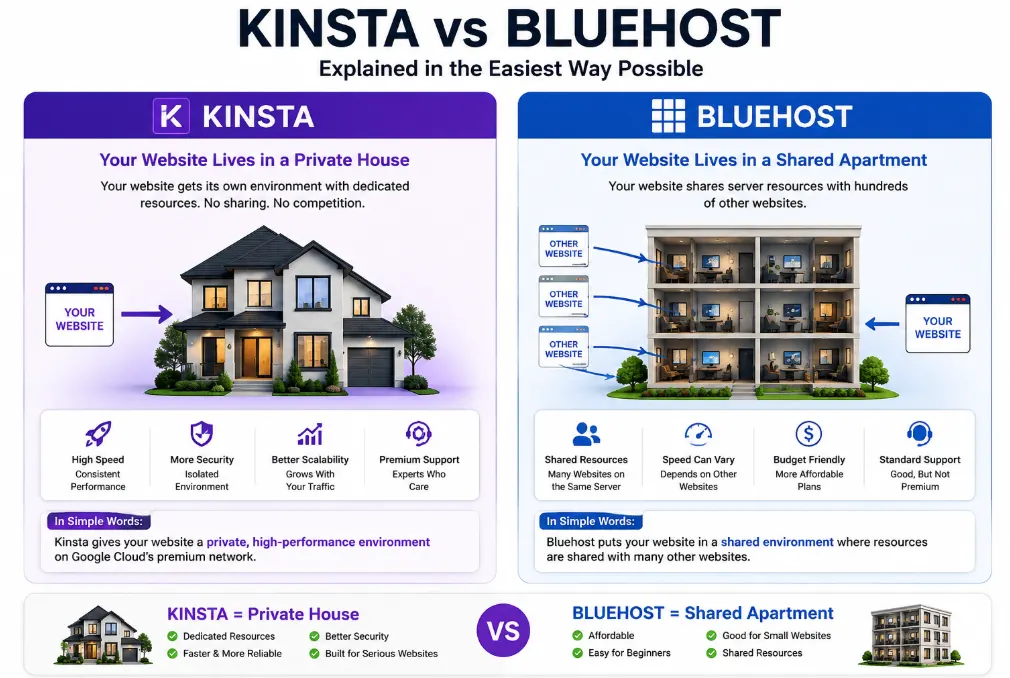
If you are trying to choose between them, you are likely trying to solve one of two problems: you want to launch a new web project as cheaply as possible, or your current website is slowing down and crashing under pressure.
Let’s look past the marketing language and break down exactly what happens to your website when you host it on these platforms.
The Architectural Reality: Containerization vs. Shared Servers
The core difference between these hosts lies in how they allocate server environment resources.
Bluehost: The Shared Neighborhood
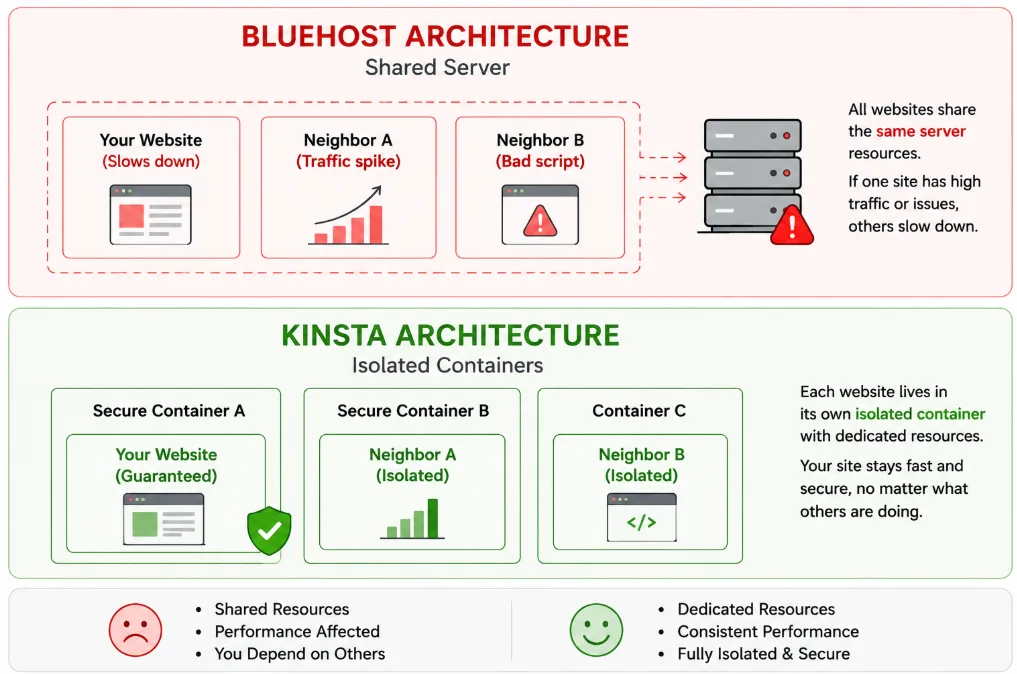
Bluehost primarily operates on a traditional shared hosting framework. Your website sits on a physical server alongside hundreds of other websites. They share the same central processing unit (CPU), random-access memory (RAM), and network interface card.
Bluehost uses terms like unmetered bandwidth, but physical hardware always has limits. If a neighboring website on your shared server experiences a sudden traffic spike or runs a poorly optimized database query, your website will suffer. This structure often leads to inconsistent page load times and unexplained downtime during peak traffic hours.
Kinsta: The Isolated Container
Kinsta does not use traditional shared hosting. The entire platform runs on the Google Cloud Platform premium tier. Instead of placing your site on a shared server, Kinsta places every single WordPress site into its own isolated Linux container.
This container holds all necessary software resources: Linux, Nginx, PHP, and MySQL. Your allocated CPU and RAM belong entirely to your website. A traffic spike on another customer’s site cannot impact your performance, ensuring consistent loading speeds regardless of server activity elsewhere.
Performance Metrics Under Intense Load
Anyone can make a lightweight, empty WordPress site look fast in a one-off speed test. The real test of a web host is how it maintains performance under simultaneous user strain.
Independent load testing data reveals how these different architectures handle stress. When simulators scale up to 1,000 concurrent visitors, Kinsta maintains a flat response time graph, processing requests without errors. The isolated container simply scales up infrastructure usage to meet the demand.
Bluehost often struggles under the same testing conditions. As concurrent users increase, response times lengthen, and the server can begin dropping connections, resulting in 502 or 504 gateway errors.
If you run an e-commerce storefront, a membership network, or a high-traffic media site, these dropped connections mean lost revenue and abandoned shopping carts.
Kinsta Pricing Plans
Kinsta takes a completely different approach to pricing. Instead of competing on cost, it focuses on premium performance, managed WordPress hosting, expert support, and cloud infrastructure designed for serious websites.
Single Site Plan ($30/month)
This plan is built for businesses, professional blogs, and ecommerce stores running a single website. It includes one WordPress installation, premium cloud hosting, CDN, backups, free migrations, advanced security, and access to Kinsta’s WordPress support engineers.
WP 2 Plan ($59/month)
The WP 2 plan is designed for users running multiple websites. It supports two WordPress installations and provides additional bandwidth, storage, and resources compared to the entry-level plan.
Business Plans (Starting at $96/month)
Kinsta’s Business plans are aimed at websites experiencing consistent growth. These plans offer increased traffic capacity, additional storage, more WordPress installs, and greater server resources for demanding websites and online businesses.
Agency Plans (Starting at $284/month)
Agency plans are built for professionals managing client websites. Along with higher resource limits, Kinsta includes agency-focused benefits and management tools that make handling multiple client projects much easier.
Enterprise Plans (Custom Pricing)
For large-scale businesses and mission-critical websites, Kinsta offers custom Enterprise solutions. These plans are designed for organizations that require dedicated resources, enterprise-grade support, custom infrastructure, and maximum performance.
My Verdict: Kinsta is considerably more expensive than Bluehost, but you’re paying for premium cloud infrastructure, specialized WordPress support, stronger performance, and a hosting platform built to scale as your business grows.
Bluehost Pricing Plans
One of the biggest reasons Bluehost remains popular is its affordable entry pricing. If you’re launching a new website and want to keep costs low, Bluehost makes it easy to get started without a large upfront investment.
Starter Plan ($3.99/month)
The Starter plan is aimed at beginners, bloggers, and small website owners. It lets you host up to 10 websites and includes 10GB NVMe storage, a free domain for the first year, free SSL, CDN integration, managed WordPress updates, and 24/7 chat support. For most first-time website owners, this plan offers everything needed to get online.
Business Plan ($6.99/month)
If you’re managing multiple websites or expect higher traffic, the Business plan provides more room to grow. You can host up to 50 websites, get 50GB storage, enhanced security features, weekly backups, and phone support in addition to live chat. This is the sweet spot for many growing businesses.
eCommerce Essentials Plan ($14.99/month)
For online stores, Bluehost offers the eCommerce Essentials plan. It supports up to 100 websites and includes WooCommerce-focused features such as payment processing, memberships, subscriptions, affiliate functionality, social login options, and other tools designed to help sell products and services online.
My Verdict: If price is your main concern, Bluehost delivers excellent value. It’s one of the most affordable ways to launch a WordPress website, especially for beginners and small businesses.
Hidden Costs and the Promotional Pricing Trap
The cost breakdown highlights a major difference in how these companies approach business pricing.
| Financial Metric | Kinsta Managed Platform | Bluehost Shared Tier |
| Advertised Entry Rate | $30 to $35 per month | $2.75 to $3.99 per month |
| Required Upfront Commitment | Month-to-month flexibility | 36 months paid upfront for lowest rate |
| Renewal Price Increase | 0% (Price remains completely stable) | Up to 305% increase on your first renewal |
| Malware Cleanup Fees | Free hack-fix protection guarantee | Paid upsell via third-party add-ons |
| Performance Debugging | Included built-in APM analytics tool | Requires separate premium plugins |
Bluehost designs its pricing model for low-cost customer acquisition. A cheap introductory rate sounds appealing, but it requires paying for three years up front. When that initial term expires, the renewal rates increase significantly.
Additionally, essential performance and security tools are often locked behind paid upsells. If you need clean backups, automated malware removal, or server-level caching, your monthly bill will rise.
Kinsta uses a transparent pricing model. The price you sign up for is the price you pay on renewal. There are no surprise renewal increases.
Security guarantees, staging areas, global content delivery networks (CDNs), and professional site migrations are included in the core subscription price. You pay for what you use, without hidden fees or forced add-on services.
Kinsta Pros and Cons
Pros of Kinsta
- Powered by Google Cloud infrastructure.
- Excellent website speed and performance.
- Isolated container architecture improves stability and security.
- Expert WordPress engineers handle support requests.
- Free website migrations included.
- Daily backups and advanced security features.
- Built-in CDN, caching, and performance optimization tools.
- Ideal for WooCommerce stores, agencies, and growing businesses.
- Scales easily as traffic increases.
Cons of Kinsta
- Much more expensive than Bluehost.
- No free domain registration.
- Overkill for hobby blogs and very small websites.
- Some advanced add-ons come at an extra cost.
- Budget-conscious beginners may find pricing difficult to justify.
Bluehost Pros and Cons
Pros of Bluehost
- Very affordable starting prices.
- Free domain included for the first year.
- Beginner-friendly dashboard and setup process.
- Officially recommended by WordPress.org.
- Free SSL certificate and CDN.
- Supports up to 10 websites, even on the entry-level plan.
- Good choice for personal blogs and small business websites.
- 24/7 customer support via chat.
Cons of Bluehost
- Renewal prices are significantly higher than introductory rates.
- A shared hosting environment can impact performance during traffic spikes.
- Not built for high-traffic or resource-intensive websites.
- Support quality can vary depending on the issue.
- Advanced performance features are limited compared to premium hosts.
- Site speed may not match managed cloud hosting providers like Kinsta.
Technical Features: Custom Panels vs. Legacy cPanel
The user interface shapes how you manage your day-to-day web development workflow.
The MyKinsta Ecosystem
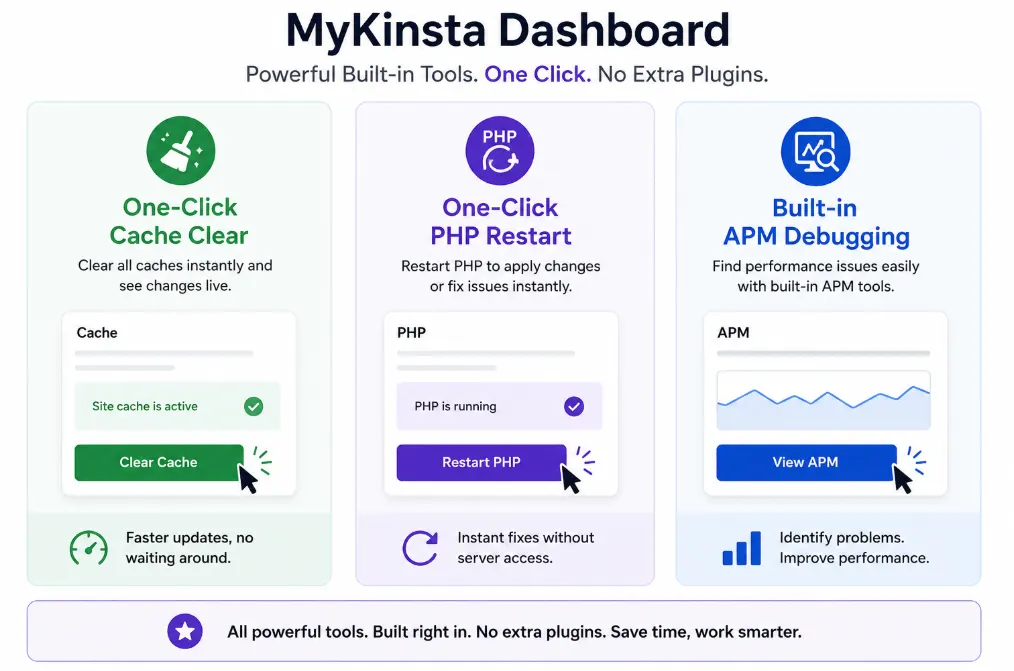
Kinsta abandoned legacy server panels to build MyKinsta, a custom dashboard engineered specifically for managed WordPress environments.
Instead of navigating through generic technical menus, you can clear server-level caches, restart the PHP engine, manage your redirects, and push staging environments to live production with single-click shortcuts.
MyKinsta also features a built-in Application Performance Monitoring (APM) tool. If a specific WordPress plugin or database query slows down your site, the APM identifies the exact file and line of code causing the issue, eliminating tedious manual troubleshooting.
The Bluehost cPanel Setup
Bluehost uses a modified version of cPanel, the traditional web hosting industry standard. While familiar to long-time developers, cPanel is designed to handle generic web hosting needs rather than optimizing specialized WordPress performance.
The interface includes promotional banners and complex file menus that can overwhelm beginners. It also lacks advanced native debugging tools. If your site slows down, you have to install third-party plugins or manually dig through error logs to find the root cause.
The Support Experience: Engineers vs. General Scripts
When your website goes offline at midnight, the structure of your host’s support team becomes critical.
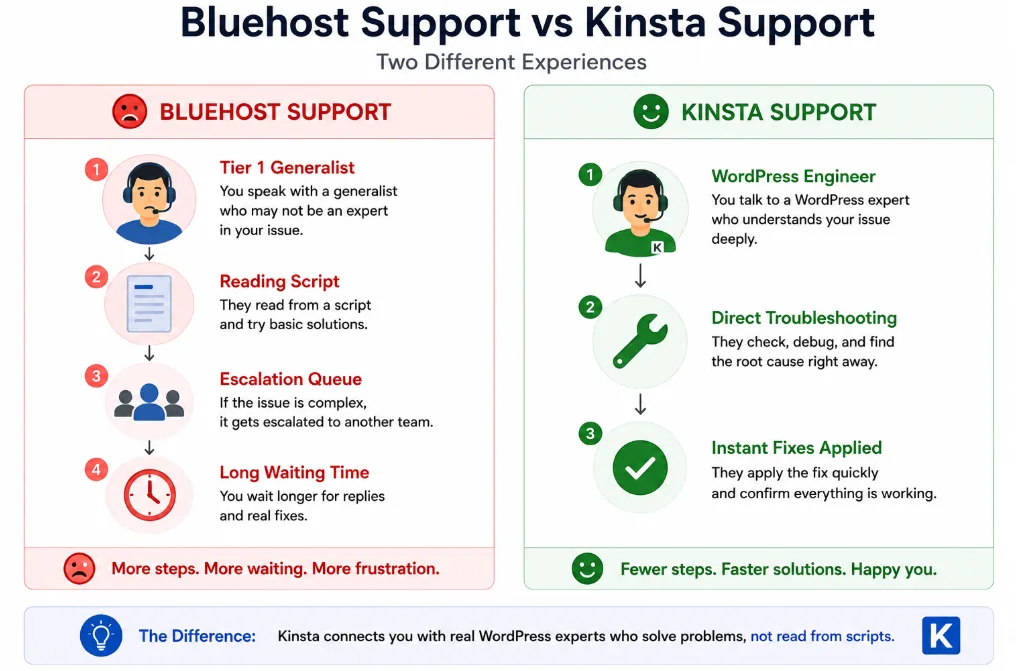
Bluehost manages a massive customer base using a multi-tiered support system. When you initiate a live chat or phone call, you connect with a Tier 1 generalist who handles everything from basic email issues to domain registrations.
They rely on pre-written troubleshooting scripts. If your issue involves complex database errors or plugin conflicts, your ticket enters a long escalation queue before reaching an expert.
Kinsta uses a single-tier support model. The support agent who answers your chat is a specialized WordPress engineer capable of reading code and running advanced terminal diagnostics. There are no scripted handoffs.
Because the support team operates exclusively via a custom in-dashboard chat system, engineers can instantly inspect your container metrics and resolve technical server problems immediately.
Data Center Footprints and Target Audiences
Network infrastructure geography dictates how fast your site loads for global visitors.
Bluehost hosts its shared infrastructure out of a primary central data center in Utah. If your business primarily serves a localized regional audience, this single location works fine.
However, if an international visitor from London, Tokyo, or Sydney tries to access your site, the physical distance means higher latency and slower load times.
Kinsta uses Google Cloud’s global fiber-optic network, giving you a choice of over 37 data center locations across six continents. When deploying a site, you select the specific physical data center closest to your primary target market.
Combined with built-in Enterprise Cloudflare integration that caches your content across hundreds of global edge locations, your site loads quickly for visitors anywhere in the world.
Concrete Alternatives: Finding the Real Middle Ground
If this guide has shown you that Bluehost is too limited for your performance needs, but Kinsta’s starting price exceeds your current budget, you still have excellent alternatives. You do not have to choose between extreme budget cuts and premium enterprise pricing.
1. SiteGround: The Best Entry-Level Upgrade
If you want affordable pricing but refuse to sacrifice core site stability, SiteGround is an excellent option. While it operates on a shared resource framework, its platform runs on Google Cloud infrastructure and includes custom speed-caching setups, daily backups, and reliable support for a fraction of premium hosting costs.
2. WP Engine: The Direct Competitor
If you need high-end managed WordPress hosting but want to compare different platform ecosystems, WP Engine is Kinsta’s primary alternative. It provides a structured developer workflow, strong staging configurations, and excellent performance optimization tailored for business applications.
Comprehensive Feature Comparison
Let’s look at a clear, feature-by-feature breakdown of both platforms.
| Evaluation Category | Kinsta Platform | Bluehost Platform |
| Server Framework | Isolated Linux Containers (LXD) | Traditional Shared Server Infrastructure |
| Cloud Engine | Google Cloud Premium Tier | Proprietary Data Centers |
| Control Panel | Custom MyKinsta Ecosystem | Legacy cPanel Interface |
| Caching Integration | Server-Level Edge Caching Included | Plan-Dependent / Plugin-Required |
| Global Locations | 37+ Worldwide Regions | 1 Centralized Data Center |
| Staging Ecosystem | Built-in DevKinsta Environments | Basic / Plan-Dependent Staging |
| Security Standards | Enterprise Cloudflare Firewall + WAF | Third-Party Security Partnerships |
FAQs
Is Kinsta’s premium hosting worth the extra cost?
Yes, if your website generates revenue or handles substantial daily traffic. The investment pays for itself by preventing site crashes, maintaining fast loading speeds, and eliminating the need to hire developers for server maintenance or malware issues.
Can I run a busy WooCommerce store on Bluehost?
You can launch one, but it is not recommended for long-term growth. E-commerce sites rely heavily on dynamic database queries that cannot be easily cached. On a shared server, simultaneous checkouts can quickly exhaust resource limits, causing slow performance or cart failures.
Does Kinsta offer standard email inbox hosting?
No. Kinsta dedicates 100% of its server resources to web traffic performance. To run custom domain emails, you will need to pair the host with a dedicated email provider like Google Workspace or Microsoft 365.
What are PHP workers and why do they matter?
PHP workers dictate how many simultaneous uncached requests your host can execute at one time. Kinsta provides a clear, guaranteed quota of PHP workers per container plan, whereas Bluehost shares its total engine capacity across all users on the server.
Does Kinsta charge extra if my traffic spikes?
Kinsta plans track usage via transparent monthly visit counts or bandwidth limits. If an unexpected viral content peak pushes you over your plan’s cap, your site stays online automatically. Kinsta simply applies a clear, predictable overage fee without shutting down your business server.
Final Verdict: Which Host Should You Choose?
Choose Bluehost if:
You are launching a personal hobby blog, a portfolio site, or a small local business page where instant loading speeds and 100% uptime are not critical to your income. It offers an affordable way to secure a domain and get an experimental WordPress site online.
Choose Kinsta if:
You run an agency, an e-commerce store, a high-traffic media site, or a growing business where site speed and reliability directly impact your bottom line. If you cannot afford to lose customers over slow page loads or server crashes, Kinsta’s isolated container architecture is the clear choice.