Key Takeaways
- LinkMiner is Mangools’ backlink checker. You enter a competitor’s domain, and it pulls data from Majestic’s index, 9.5 trillion backlinks covering 2.5 trillion unique URLs crawled since 2013.
- Ahrefs starts at $129/month. LinkMiner costs $18.85/month on annual billing. The core job both tools do for most solo SEOs is identical: find which sites link to a competitor and figure out how to get those same links.
- Trust Flow and Citation Flow are Majestic metrics, not Mangools inventions. TF measures link quality against manually reviewed seed sites. CF measures link volume. A high CF with a low TF signals a spammy link profile. Always read both numbers together.
- LinkMiner’s Link Strength score combines TF, CF, DoFollow status, and referring domain count into one number. During large-scale prospecting, it removes the need to cross-check five columns manually.
- The live preview panel is the feature that no other tool at this price offers. Click any backlink row and the referring page loads inside the tool, automatically scrolled to the exact anchor location with an orange highlight. Ahrefs does not have this. SEMrush does not have this. Moz does not have this.
- The Basic plan allows 100,000 backlinks per month. Solo bloggers will not hit that ceiling. Agencies running ten or more client campaigns will need Premium or Agency.
- LinkMiner does not do keyword research or rank tracking on its own. For that, you need the full Mangools suite, which bundles KWFinder, SERPChecker, SERPWatcher, and SiteProfiler alongside LinkMiner.
LinkMiner is the backlink checker that finally makes sense for bloggers, niche site builders, and small agencies tired of paying Ahrefs money for Ahrefs features they don’t fully use.
Ahrefs starts at $129/month. SEMrush is $29/month. For most solo SEOs, that’s an annual expense that hurts. And the worst part? You’re paying for keyword gap analysis, content explorers, and enterprise dashboards when all you actually need is: which sites link to my competitor, and how do I get those same links?
That’s exactly what LinkMiner does. And it does it brilliantly.
What Is LinkMiner? (And Why It’s Not Just Another Backlink Checker)
LinkMiner is Mangools’ dedicated backlink analysis tool. You plug in a competitor’s domain or URL. It instantly pulls backlink data from one of the most trusted databases in SEO.
Here’s the number that matters: 9.5 trillion backlinks in the database, pulled from both Majestic’s Fresh Index and Historic Index. That’s been crawling since July 2013 and covers 2.5 trillion unique URLs.
Ahrefs built its own crawler. SEMrush built its own crawler. Mangools chose to power LinkMiner with Majestic’s data, which is a deliberate and smart decision. Majestic has been the gold standard for backlink data for over a decade.
The result? You get enterprise-level backlink intelligence at a fraction of the price.
Also, check: 8 Killer Backlink Checker Tools to Beat Your Competitors
The Metrics That Actually Matter: TF, CF, and Link Strength
This is where LinkMiner gets serious. And this is where it pulls ahead of most budget tools.
Trust Flow (TF)
Trust Flow is a Majestic metric scored from 0 to 100. It measures the quality of a backlink by comparing it to a set of manually reviewed, trusted seed sites across the web.
A TF of 20+ is a solid, healthy backlink. Sites like Search Engine Journal score 62. Backlinko-level authority sites are in the 70-80+ range.
When you’re prospecting for backlinks, therefore, you filter for TF >= 20 first. Everything below that is usually not worth your outreach time.
Citation Flow (CF)
Citation Flow also scores from 0 to 100. It measures the volume of links pointing to a site, not the quality.
Here’s the critical insight most beginners miss: a high CF with a low TF is a red flag. It means a site has lots of links but from low-quality, spammy sources. Always check both numbers together.
When TF and CF are roughly balanced, you’re looking at a natural, trustworthy link profile.
Referring IPs vs. Referring Domains
LinkMiner also shows you Referring IPs separately from Referring Domains. Why does this matter?
Because multiple domains can sit on a single IP address. If a link network puts 50 blog sites on one server, they all show as 50 referring domains, but only 1 referring IP. A healthy backlink profile has these numbers close to each other.
This is a detail that Ahrefs charges you $129/month to see. LinkMiner shows it at $18.85/month.
The Link Strength Score (LS)
Mangools built their own proprietary metric called Link Strength. It’s a single score from 0 to 100 that combines Citation Flow, Trust Flow, DoFollow/NoFollow status, number of referring domains, and several other factors into one number.
Instead of analyzing 5 different columns, you glance at the LS score and immediately know how powerful that backlink is.
This is the single feature that saves the most time during large-scale link prospecting.
Every Input Type You Can Use in LinkMiner
This part is critical, and most tutorials skip it. Getting the input URL wrong means getting the wrong data.
LinkMiner supports four input formats:
Root domain — example.com Use this to see ALL backlinks pointing to the entire website. This is the most common use case and the recommended starting point.
Subdomain — subdomain.example.com or www.example.com Use this when you want backlinks specifically pointing through the www version or a subdomain. Note that www.example.com and example.com are treated as different inputs and will give different results.
Exact URL — https://example.com/blog/specific-post Use this when you want backlinks pointing to one specific page only. Critical for skyscraper campaigns targeting a single piece of competitor content.
Path URL — https://example.com/blog/* The asterisk acts as a wildcard. This shows all backlinks pointing to any URL within that subdirectory. Extremely useful for seeing all links to a competitor’s entire blog section.
Important: http://example.com and https://example.com are treated as completely different URLs. Always double-check which version you’re entering.
The Live Website Preview: The Feature Nobody Else Has at This Price
This is the feature that genuinely separates LinkMiner from everything else under $50/month.
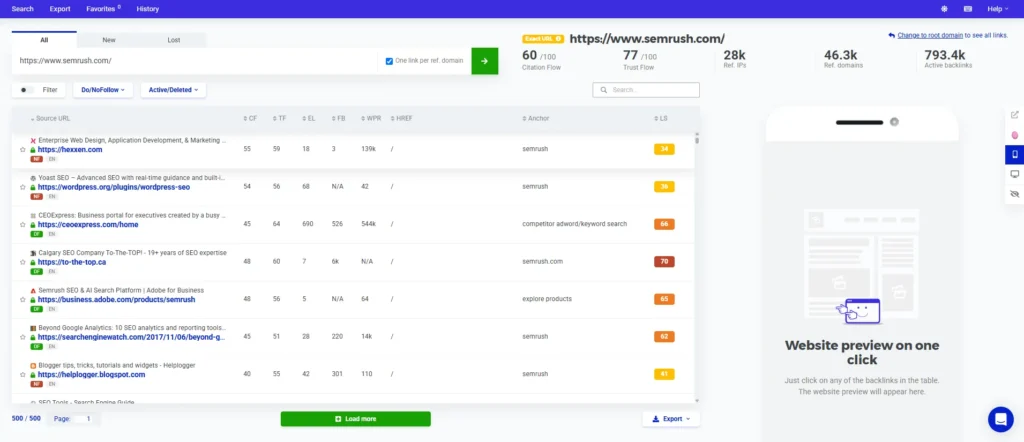
When you click on any backlink row in the results table, a live preview of the referring website loads directly inside the tool’s right panel. The preview automatically scrolls to the exact location of the anchor text on that page. The anchor is highlighted with an orange border so you can’t miss it.
You see the link in full context without opening a single new browser tab.
Why does context matter so much? Because a link buried in a sidebar widget and a link placed naturally inside a 3,000-word editorial article are worth completely different amounts of SEO value. One is worth pursuing. One usually isn’t.
From the right panel, you can also:
- Open the linking page in a new browser tab
- Send the URL directly to SiteProfiler for deeper domain analysis
- Switch between the desktop and mobile view of the referring page
- Close the preview and return to the results table
Ahrefs doesn’t have this. SEMrush doesn’t have this. Neither does Moz. No other major backlink tool at any price point shows you a live embedded preview with highlighted anchor placement.
This single feature saves hours every week during link prospecting.
The Backlinks Table: What All Those Columns Mean
Every row in the results table includes these attributes right below the Source URL:
DoFollow / NoFollow — Whether the link passes SEO equity or not.
Deleted tag — If a backlink has been removed from the source page, it’s tagged DEL. This is useful for reclamation campaigns.
Image tag — Whether the backlink comes from an image rather than a text anchor.
Language — The language of the referring page. Useful when you want to filter for English-language links only.
You can also sort every column. The most useful sort orders for practical link building: sort by LS (highest to lowest) to see the most powerful links first, or sort by TF to see the most authoritative referring pages.
Pagination and the “Load More” System
LinkMiner loads results in batches of 500. The display at the bottom shows you something like 500/500, which means 500 links are displayed out of 500 currently loaded.
When you click “Load more,” another 500 backlinks load from the database. This is intentional. LinkMiner prioritizes showing you the most powerful, high-value links first rather than dumping thousands of low-quality links on your screen.
For most competitor analysis sessions, the first 500 results are more than enough. You’ll find your best opportunities well before you need to load more.
How to Use LinkMiner: The Exact Workflow for Real Results
Here’s the step-by-step process that actually works.
Step 1: Enter the competitor’s root domain
Go to LinkMiner. Type your competitor’s root domain, for example, competitor.com. Select “All links” to see the full picture. Check the “One link per referring domain” box first. This removes duplicates and shows you the cleanest view of unique linking sites.
Step 2: Check the domain-level metrics at the top
Before you look at any individual backlinks, check the overall domain stats. You’ll see TF, CF, Referring IPs, Referring Domains, and Total Active Backlinks for the domain you just analyzed. This gives you a benchmark for what a “good” link from this niche looks like.
Step 3: Apply the DoFollow + TF filter
Click Filter. Set Trust Flow minimum to 20. Toggle to show DoFollow links only. This instantly removes the noise and shows only the high-quality, actionable links. Your prospect list just got dramatically more focused.
You can also filter by:
- Link Strength (min/max)
- Citation Flow (min/max)
- External Links count
- Alexa Rank
- Source URL (to find links from a specific site)
- Target HREF path
- Target Anchor text
Step 4: Use Live Preview to audit each link in context
Click each promising row. The right panel loads the live preview. Look at exactly where and how the anchor text is placed. Is it inside the body of a copy of an article? Is it in a resource list? Is it in the footer? Editorial links within the article body copy are the most valuable. Everything else needs closer scrutiny.
Step 5: Star the best opportunities
Click the star icon next to any backlink you’d like to target. LinkMiner automatically creates a Favorites list named after the domain you analyzed. You can access all your Favorites lists from the top-left menu of the app. You can also delete lists you no longer need.
This replaces the traditional “copy to a spreadsheet” step entirely.
Step 6: Export and move to outreach
When you’re done prospecting, click Export in the top-right corner of the backlinks table. You can either copy all results directly to the clipboard or download a full CSV file. Take that CSV into your outreach workflow.
LinkMiner vs. Ahrefs vs. SEMrush: The Honest Comparison
| Feature | LinkMiner (Mangools) | Ahrefs | SEMrush |
|---|---|---|---|
| Starting Price (Annual) | ~$18.85/mo | $129/mo | $29/mo |
| Backlink Database | 9.5 Trillion (Majestic) | 35+ Trillion | 43 Trillion |
| Live Link Preview | Yes, with anchor highlight | No | No |
| Trust Flow / Citation Flow | Yes (Majestic-powered) | No (uses DR/UR) | No (uses Authority Score) |
| Favorites / Prospect Saving | Yes, built-in | No | No |
| DoFollow Filter | One-click toggle | Yes | Yes |
| Deleted Backlink Tracking | Yes, DEL tag | Yes | Yes |
| Export to CSV | Yes | Yes | Yes |
| Ease of Use | Very easy | Moderate | Moderate |
| Best For | Niche bloggers, freelancers, small agencies | Enterprise, large agencies | Full marketing teams |
The database size gap is real. Ahrefs has a larger crawler. SEMrush has a larger crawler. However, for 90% of link building use cases, especially competitor replication and skyscraper campaigns, 9.5 trillion backlinks is more than enough data to find hundreds of actionable opportunities.
What LinkMiner lacks in raw database size, it makes up for with the Live Preview feature, the cleaner UI, and the dramatically lower price point.
Real Strengths and Honest Limitations
What LinkMiner Does Better Than Anything at Its Price
The Live Preview panel is genuinely unmatched. No other tool under $50/month shows you anchor placement in context. This alone justifies the subscription.
Majestic-powered data is battle-tested. Trust Flow and Citation Flow have been industry-standard metrics for years. Ahrefs has a Domain Rating. SEMrush has an Authority Score. None of them has the same historical depth as Majestic’s index, which has been crawling since 2013.
The Favorites system is practical and fast. It replaces manual spreadsheet work with an in-tool workflow that actually sticks.
The filter system is comprehensive. You can filter by LS, TF, CF, EL, AR, Source URL, Target HREF, and Anchor text simultaneously. Most budget tools give you two or three filter options. LinkMiner gives you eight.
25,000+ paying customers. Authority Hacker called it “basically budget Ahrefs” and gave it 4.8/5. PCMag rated it 4.0. These are not paid reviews. These are independent assessments from publications with reputations to protect.
Where It Falls Short
The database is smaller than Ahrefs and SEMrush. This matters when analyzing extremely large, high-authority sites with millions of backlinks. For most niche sites and small business competitors, however, you’ll never hit this ceiling.
Data freshness relies on Majestic. Because LinkMiner uses Majestic’s index rather than its own dedicated crawler, very recent backlinks can take time to appear. The “New links” tab shows daily-updated data from the last 30 days, which partially addresses this.
No keyword data or SERP features are standalone. LinkMiner is purpose-built for backlinks only. If you need keyword research alongside backlink analysis, you’ll want the full Mangools suite.
Basic plan backlink limit is 100k/month. This is generous for solo bloggers. Agencies running 10+ client campaigns will find it limiting and should consider the Premium or Agency plan.
Pricing Breakdown: Which Plan Do You Actually Need?
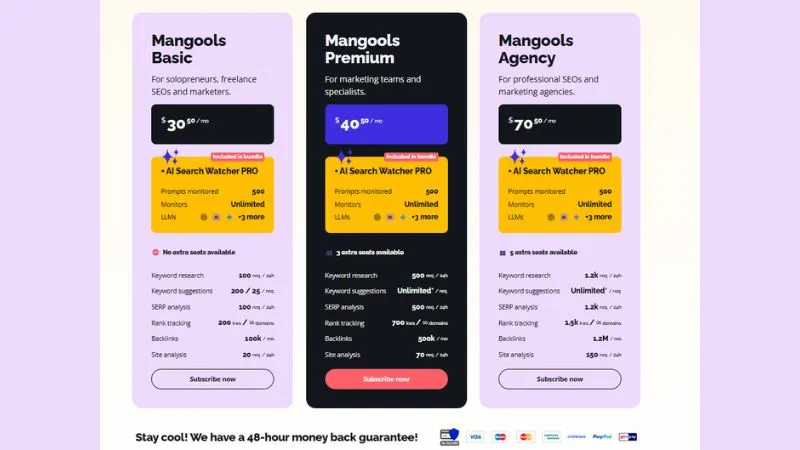
Mangools Basic — $18.85/month (annual) 100,000 backlinks/month, 100 keyword research requests/day, 200 rank tracking keywords, 20 site analysis requests/day. No extra seats. Best for solo bloggers and niche site owners.
Mangools Premium — $26.35/month (annual) 500,000 backlinks/month, unlimited keyword suggestions, 700 rank tracking keywords, 3 extra seats. Best for freelancers managing 2-5 clients.
Mangools Agency — $48.85/month (annual) 1.2 million backlinks/month, 1,200 keyword research requests/day, 1,500 rank tracking keywords, 5 extra seats. Best for small to mid-size agencies.
All plans include AI Search Watcher PRO bundled in, which monitors your brand across ChatGPT, Google AI, Claude, and Perplexity. That’s a genuinely useful addition for brands tracking their AI search visibility in 2026.
Mangools also offers a 48-hour money-back guarantee on all plans.
FAQs
Is there a free trial for LinkMiner?
Yes. Mangools gives a free trial with LinkMiner and other tools. No credit card is usually needed. You get limited daily searches to test it.
How accurate is the backlink data?
LinkMiner uses data from Majestic, a trusted backlink database. It is accurate for SEO work, but no tool shows 100% of all backlinks. Ahrefs and SEMrush may show some different links.
Is LinkMiner good for beginners?
Yes. It is very beginner-friendly. The interface is simple, metrics are easy to understand, and you don’t need technical SEO skills to use it.
Should I buy LinkMiner alone or the full Mangools suite?
The full Mangools suite is a better value. It includes keyword research, rank tracking, SERP analysis, and backlink tools. Buying only LinkMiner is not usually needed unless you only want backlinks.
How is Link Strength different from Trust Flow?
Trust Flow shows the quality of the source page. Link Strength is Mangools’ score that combines multiple factors like Trust Flow, Citation Flow, and link type to show overall backlink power.
Conclusion
LinkMiner does one job: find which sites link to your competitors and help you get those same links. At $18.85/month, it gives you Majestic’s 9.5 trillion backlink index, Trust Flow, Citation Flow, and a live preview panel that no other tool at this price offers.
The database is smaller than Ahrefs. Data freshness depends on Majestic’s crawl schedule. It does not do keyword research or rank tracking.
For solo bloggers and niche site owners running competitor replication or skyscraper campaigns, none of those gaps matter. You get the data you actually need at a price that does not hurt.