Key Takeaways
- This mobile SEO checklist reflects what matters in 2026, not outdated advice from years ago.
- FID is gone. Google now uses INP to measure how responsive your site feels when users interact with it.
- Mobile-first indexing means Google primarily evaluates your mobile pages, not your desktop version.
- AI Overviews reward detailed, helpful content. Thin pages are easier to summarize and easier to ignore.
- Passing Core Web Vitals is still an opportunity. Many top-ranking pages struggle with LCP, INP, or CLS.
- Small issues like poor tap targets, intrusive popups, and hard-to-read text can quietly hurt the mobile experience.
- You don’t need to rebuild your website. A few targeted fixes often deliver the biggest gains.
- Start with your highest-traffic pages first. That’s usually where you’ll see results the fastest.
Most “mobile SEO checklists” online are the same recycled 40-item list from 2019. Compress images. Use a responsive design. Add a viewport meta tag. Useful five years ago. Mostly irrelevant today.
Google killed FID and replaced it with INP in 2024. AI Overviews now answer most informational searches directly on the results page, often before anyone taps your link. And Google has been mobile-first indexing every site for years now, which means your mobile experience isn’t part of your SEO. It basically is your SEO.
So here’s a checklist built for where mobile search actually stands right now, not where it stood when viewport tags were the cutting edge.
I’ll walk through what to check, why it matters, and exactly how to fix it when something’s broken. No generic “optimize your images” advice without telling you what “optimize” means.
Why Mobile SEO Isn’t Optional Anymore
Quick context, because this changes how you should think about every item below.
Google switched to mobile-first indexing for all sites years back. That means Googlebot crawls and indexes the mobile version of your site, not the desktop one. If your mobile page is missing content, has a broken layout, or loads slowly, that’s the version Google judges you on. Full stop.
Add to that: in India specifically, mobile accounts for the overwhelming majority of organic search traffic for most niches I’ve worked in, local business sites included. If you’re running RaipurTalks.com or any local-intent site, your audience is searching on a phone in traffic, between chores, with patchy 4G. Speed and usability aren’t nice-to-haves. They’re the difference between a visitor and a bounce.
The Real Mobile SEO Checklist
1. Confirm Google Is Using Mobile-First Indexing
Before optimizing anything else, make sure Google is crawling your site with its smartphone crawler.
Open Google Search Console → URL Inspection, inspect a few important pages, and expand Page Indexing. Under Crawl, confirm that Crawled as: Googlebot smartphone appears. Also, verify that the page fetch was successful and indexing is allowed.
Why this matters
Google uses mobile-first indexing. That means it primarily evaluates your mobile version for rankings. If your mobile pages hide content, internal links, or structured data, Google may index an incomplete version of your page and weaken important ranking signals.
This problem is still common with older themes, separate mobile URLs, and poorly implemented AMP setups.
Fix
Use Chrome DevTools and switch between desktop and mobile views. Compare both versions and make sure:
- The main content matches
- Internal links are present
- Structured data is available
- Images and headings aren’t hidden
- Word count is roughly the same
Your mobile version should contain everything you want Google to index.
2. Fix Core Web Vitals, With INP As the Priority Metric
This is the one most checklists still get outdated on. FID is gone. Google replaced it with INP (Interaction to Next Paint) in March 2024, and it’s stayed the responsiveness metric since.
Here’s what “good” looks like for mobile in 2026:
| Metric | Good | Needs Improvement | Poor |
|---|---|---|---|
| LCP (Largest Contentful Paint) | Under 2.5s | 2.5s to 4s | Over 4s |
| INP (Interaction to Next Paint) | Under 200ms | 200ms to 500ms | Over 500ms |
| CLS (Cumulative Layout Shift) | Under 0.1 | 0.1 to 0.25 | Over 0.25 |
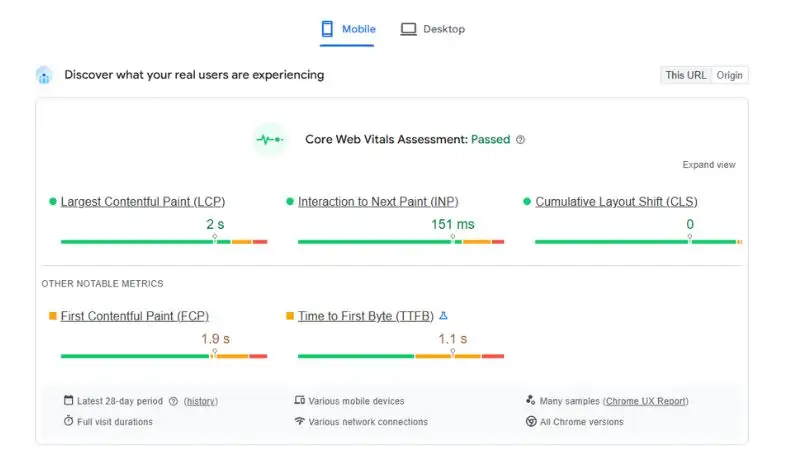
Where to check it: Search Console’s Core Web Vitals report (uses real user data, called field data) and PageSpeed Insights for a per-page lab test.
Worth noting: when I checked the #1 ranking page for this exact keyword, its INP came back at 62-167ms across two test runs, comfortably in the “good” range. Its problem wasn’t responsiveness at all; it was LCP and server response time. That’s the thing about Core Web Vitals: a page can nail INP and still fail the overall assessment because of a completely different metric. Check all three, not just the one you assume is the problem.
Common INP killers:
- Heavy ad scripts that block the main thread
- Comment plugins and chat widgets that load on interaction
- Carousel and slider plugins (genuinely, just avoid these)
- Render-blocking JavaScript in your theme
Note: If you see "Not enough usage data in the last 90 days for this device type," don't panic. It simply means your site hasn't collected enough real-world Chrome user data yet, not that there's a performance problem.
3. Test Mobile Usability With PageSpeed Insights
Google retired both the Mobile-Friendly Test tool and the Mobile Usability report in Search Console. That doesn’t mean mobile usability no longer matters. It just means Google expects site owners to use modern tools like PageSpeed Insights and Lighthouse.
Run your pages through PageSpeed Insights and review the mobile results. Pay attention to common usability issues, including:
- Text that’s too small to read comfortably
- Tap targets that are too close together
- Content wider than the screen
- Layout shifts that affect usability
- A missing or incorrect viewport tag
If your theme is missing the viewport tag, add:
<meta name="viewport" content="width=device-width, initial-scale=1">This single line is still essential. Without it, browsers can’t properly adapt your pages to different screen sizes.
Why this matters
Google no longer provides a separate mobile-friendly score, but mobile usability still affects the overall page experience. If users need to zoom, scroll sideways, or struggle to tap buttons, they’ll leave.
In 2026, the goal isn’t to pass an old Mobile-Friendly Test. It’s to deliver a smooth experience for real users, and PageSpeed Insights is one of the best tools for finding problems before your visitors do.
4. Make Tap Targets Actually Tappable
This sounds basic, but I see it constantly on local business sites and WordPress blogs running older themes: navigation menus, FAQ accordions, and CTA buttons sized for a mouse cursor, not a thumb.
The standard: buttons and links should be at least 44x44px (Apple’s guideline) to 48x48px (Google’s guideline), with enough space around them that a thumb doesn’t accidentally tap the wrong link.
If you’re building custom components, like a Key Takeaways box or FAQ accordion, test the tap targets on an actual phone before publishing. Desktop preview lies to you here.
5. Audit Your Mobile Pop-Ups and Interstitials
Google has penalized intrusive mobile interstitials since 2017, and this hasn’t softened. If a visitor lands on your page and gets hit with a full-screen email signup or app download prompt before seeing any content, that’s a negative ranking signal.
What’s allowed:
- Legal/age verification popups
- Login dialogs for content genuinely behind a login
- Small banners that take up a reasonable amount of screen space
What gets you flagged:
- Full-screen popups appearing immediately on page load
- Popups that are hard to close (tiny X button, no clear exit)
If you’re running affiliate offers or newsletter signups on RohitSharma.co, use a slide-in or bottom banner instead of a full takeover. It converts nearly as well and won’t hurt rankings.
6. Compress and Properly Serve Images for Mobile
“Compress your images” is in every checklist, but here’s what actually matters in practice:
- Use WebP or AVIF, not JPEG/PNG, for anything that isn’t a logo needing transparency at full quality. AVIF compresses better but has slightly less universal support; WebP is the safer default in 2026.
- Serve responsive image sizes using
srcset, so mobile devices download a phone-sized image, not a 2000px desktop banner scaled down by CSS. - Lazy-load below-the-fold images, but never lazy-load your LCP image (usually your hero image or featured image). Lazy-loading the LCP element actually hurts your LCP score.
html
<img src="image-800w.webp"
     srcset="image-400w.webp 400w, image-800w.webp 800w, image-1200w.webp 1200w"
     sizes="(max-width: 600px) 400px, 800px"
     alt="descriptive alt text"
     loading="lazy">
Drop loading="lazy" for any image above the fold.
7. Check Font Sizes and Readability Without Zoom
Google’s baseline: body text should be at least 16px on mobile. Smaller and you’re forcing users to pinch-zoom, which is exactly the “poor mobile experience” signal Google’s looking to penalize.
Line height matters too. 1.5x line height for body copy keeps text readable on small screens without feeling cramped.
8. Structure Content for Skimmability (Mobile Reading Behavior Is Different)
People don’t read mobile pages top to bottom the way they read desktop pages. They scan, jump to headers, look for the answer, and bounce if they don’t find it fast.
What works:
- Short paragraphs. Two to three sentences max for most of your content.
- Descriptive H2s and H3s that work as scannable signposts, not cute or vague headers.
- Bullet points and numbered lists for any sequential or comparative information.
- Bold key phrases so skimmers catch the main point without reading every word.
This is also exactly why Key Takeaways boxes at the top of an article work so well for mobile readers; they answer the “is this page worth my time” question in three seconds.
9. Optimize for AI Overviews, Not Just Blue Links
Here’s the part most 2026 checklists are still missing entirely.
Google’s AI Overviews now answer a large share of informational mobile searches directly in the SERP. If your content is generic and easily summarized (“mobile SEO means making your site work well on phones”), an AI Overview can answer that without anyone clicking through to you.
What still earns the click:
- Specific data and numbers from your own testing or experience
- Tools, templates, and downloadable checklists
- Comparisons and opinions, an AI summary can’t fully replicate
- Content depth that goes beyond what a three-sentence summary covers
This is part of why I’ve shifted toward heavier use of real examples and specific numbers in long-form content instead of generic explanations. AI Overviews can paraphrase a definition. They can’t replicate a real case study with your actual numbers in it.
10. Check Mobile Page Speed By Connection Type, Not Just Wifi
PageSpeed Insights tests are usually run on a fast connection by default unless you change settings. But a huge share of mobile users, especially across India and other markets with mixed 4G/5G coverage, are on slower connections than your test assumes.
Use PageSpeed Insights’ “Slow 4G” throttling setting or check the field data (real-user data) in the same report instead of relying purely on lab data. Field data reflects what actual visitors experience, and lab data reflects an idealized test environment.
11. Audit Mobile Internal Linking
On mobile, internal links often get squeezed into navigation menus that collapse into a hamburger icon, or get cut from sidebars entirely because there’s no room. That’s a problem because internal linking is one of your strongest on-page ranking signals, and if it disappears on mobile, you’re sending a weaker version of your site to the version Google actually indexes.
Check:
- Does your mobile nav menu still include your key category and pillar pages?
- Do in-content links (the ones inside your blog posts) render the same on mobile as desktop?
- Are related-post sections showing up on mobile, or getting hidden by the theme?
12. Make Sure Structured Data Renders on Mobile
Schema markup (FAQ schema, Article schema, Review schema, LocalBusiness schema) needs to be present and valid on the mobile-rendered version of your page, since that’s the version Google crawls.
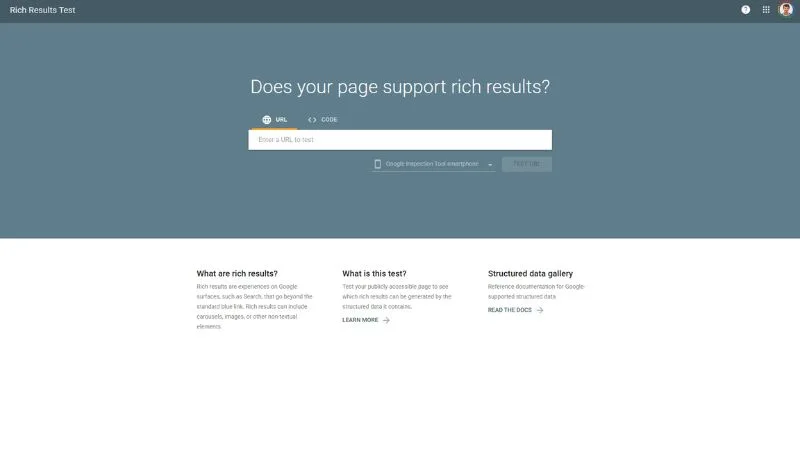
Test with Google’s Rich Results Test, but specifically check the mobile rendering, not just that the schema exists in your HTML source.
For FAQ boxes specifically (relevant if you’re running FAQ schema on local content pages), make sure the accordion functionality doesn’t accidentally hide the answer text from the DOM on mobile. Some accordion plugins remove collapsed content from the page entirely instead of just hiding it visually, which means Google may not see that text at all.
13. Test Forms and CTAs on Real Devices
Contact forms, newsletter signups, and affiliate CTA buttons need actual mobile testing, not just a responsive check. Common issues:
- Dropdown menus that are unusable on touchscreens
- Form fields that don’t trigger the right mobile keyboard (a phone number field should bring up the numeric keypad, not the full alphabet keyboard)
- CTA buttons positioned where they’re covered by mobile browser address bars or app banners
14. Avoid Mobile-Specific Layout Shift Triggers
CLS (layout shift) issues are often worse on mobile than on desktop because of smaller viewports and slower-loading ad units. Common culprits:
- Ads that load without a reserved space, pushing content down after the user starts reading
- Web fonts that load late and reflow text (use
font-display: swapand preload critical fonts) - Images without defined width/height attributes cause the browser to not reserve space before the image loads
15. Check Your Mobile Site Search and Navigation Depth
If your site has an internal search, test it on mobile. Broken or clunky mobile search increases bounce rate, which is a behavioral signal Google does pick up on through engagement metrics over time.
Also, check navigation depth: can a mobile user reach any important page within three taps from the homepage? If your category structure requires five taps to reach a money page, that’s both a UX problem and a crawl-budget problem.
16. Verify Mobile Voice Search Compatibility
Voice search queries skew conversational and question-based (“what’s the best mobile SEO checklist for 2026” instead of “mobile seo checklist”). This connects directly back to your content structure.
Practical fix: structure at least some of your H2/H3 headers as natural questions, and answer them directly in the first sentence or two below the header. This format works for both voice search and AI Overview extraction, since both prioritize content with a clear, immediate answer.
17. Run a Mobile Crawl With a Tool Like Screaming Frog
Set your crawler’s user agent to Googlebot Smartphone and crawl your site. This shows you exactly what Google sees on mobile, including:
- Missing meta titles or descriptions on mobile-specific URLs
- Broken internal links that only break on mobile templates
- Pages that return different status codes for mobile vs desktop crawlers (rare, but it happens with some caching setups)
A Real Example of a Mobile SEO Fix
One page I worked on had a hero carousel at the top. It looked great, but on mobile, PageSpeed Insights reported an LCP of 4.8 seconds, which put the page firmly in the “poor” category.
The fix turned out to be simple.
I removed the slider and replaced it with a single optimized WebP image using the proper srcset attributes. Since the image appeared above the fold, I also made sure it wasn’t lazy-loaded.
After that change, the page’s mobile LCP dropped to 1.9 seconds. Nothing else changed. No new content. No backlinks. No design overhaul.
That’s why generic advice like “improve page speed” isn’t very helpful.
The real gains come from opening PageSpeed Insights, finding the exact element causing the slowdown, and fixing that specific problem. Sometimes, removing one plugin or replacing one image is all it takes to move a page from poor to passing.
Common Mobile SEO Mistakes That Hurt Rankings
Most mobile SEO problems don’t come from missing some advanced tactic. They come from small mistakes that quietly add up over time.
Testing Only on Your Own Phone
Your latest iPhone or flagship Android isn’t what most visitors use. Someone on a slower connection with a three-year-old device may have a completely different experience.
Use PageSpeed Insights, throttle your connection in Chrome DevTools, and if possible, test on an older phone. That’s much closer to the real world.
Assuming Desktop Performance Equals Mobile Performance
A page can pass Core Web Vitals on desktop and still struggle on mobile. Fonts, images, ads, and layouts often behave differently on smaller screens.
Always check the mobile report. Never assume desktop results tell the whole story.
Ignoring Real User Data
Lab scores are useful, but they don’t tell the full story. Search Console’s Core Web Vitals report uses real Chrome user data collected over time.
If users are experiencing slow interactions or layout shifts, trust the field data over a single Lighthouse test.
Writing Thin Content for AI Overviews
Some site owners think shorter content is the key to appearing in AI Overviews.
In reality, the opposite often works better.
Detailed content with examples, screenshots, FAQs, and original insights gives AI more information to reference while still leaving plenty of reasons for people to click through and read the full article.
Forgetting That Mobile-First Indexing Means Mobile First
Google primarily evaluates the mobile version of your site.
If your mobile pages hide content, internal links, images, or schema markup that appear on desktop, Google may never see them. Always make sure your mobile version contains everything you want indexed.
Chasing Scores Instead of User Experience
A perfect PageSpeed score doesn’t guarantee better rankings.
Focus on what visitors actually experience. Fast loading pages, readable text, stable layouts, and easy navigation matter far more than chasing a 100/100 score.
FAQs
What is a mobile SEO checklist?
A mobile SEO checklist is a set of best practices used to improve your website’s performance, usability, and rankings on smartphones. It typically includes mobile-first indexing, Core Web Vitals, page speed, responsive design, and content optimization.
How do I improve mobile SEO?
Start with your most important pages. Improve loading speed, fix Core Web Vitals, make sure content displays properly on smaller screens, and test the pages using PageSpeed Insights and real devices.
How do I check my mobile SEO for free?
PageSpeed Insights and Lighthouse are the best free tools for analyzing mobile performance. Google Search Console also helps you monitor indexing and Core Web Vitals using real-world user data.
What are the most important mobile SEO ranking factors in 2026?
Core Web Vitals, mobile-first indexing, page speed, responsive design, crawlability, and high-quality content are some of the biggest factors. User experience matters more than ever.
What’s a good INP score?
An INP score below 200 milliseconds is considered good. Between 200 and 500 milliseconds needs improvement, while anything above 500 milliseconds is considered poor.
Do I need a separate mobile website?
No. A responsive website is usually the best option. Maintaining a separate m.example.com site adds complexity without providing meaningful SEO benefits.
Does AMP still matter for mobile SEO?
Not really. Most websites now focus on fast, responsive pages instead. AMP is no longer required for Top Stories and offers little advantage for most sites.
How often should I run a mobile SEO audit?
Review your top pages every month and after major theme, plugin, or design updates. Small changes can introduce performance issues over time.
Is mobile SEO still important in 2026?
Absolutely. Google uses mobile-first indexing by default, and most searches happen on mobile devices. A poor mobile experience can hurt both rankings and conversions.
Conclusion
Mobile SEO in 2026 isn’t about chasing dozens of outdated tips. A few fundamentals make the biggest difference.
Focus on Core Web Vitals, make sure Google sees your mobile content correctly, and create pages with enough depth to compete in a world where AI Overviews answer basic questions instantly.
Don’t try to overhaul your entire site overnight. Instead, use this Mobile SEO Checklist to audit your three highest-traffic pages first. Run them through PageSpeed Insights, check your Core Web Vitals in Search Console, and test them on an actual phone, preferably on a slower connection.
Fix the issues that matter most, then move on to the next page.
That’s where you’ll usually find the biggest ranking gains. And it’s a lot easier than rebuilding your site from scratch.