Key Takeaways
- Moz Pro is a complete SEO and AI visibility platform covering link research, keyword research, competitive intelligence, site audits, rank tracking, and AI brand monitoring, all in one dashboard.
- Domain Authority, Page Authority, and Spam Score are Moz’s core trust metrics, backed by a live index of 40.7 trillion links across 718 million root domains.
- The Link Intersect tool instantly shows you websites that link to your competitors but not to you, giving you a ready-made list of pre-qualified outreach targets.
- Moz Pro now tracks your brand inside AI search engines like ChatGPT and Google AI Mode, so you can see how often you appear in AI-generated answers compared to competitors.
- A free Moz Community account gives you 10 backlink queries per month, including access to DA, PA, Spam Score, and anchor text data, with no credit card required.
500,000 marketers use Moz Pro every month. But most of them only scratch the surface of what it can actually do.
They check their Domain Authority. Maybe run a quick backlink report. Then log out.
That’s a massive missed opportunity. Because Moz Pro is not just a backlink checker, it’s a full SEO and AI visibility platform. It covers everything from technical site audits to keyword research to competitive intelligence to tracking your brand inside ChatGPT responses.
In this review, I’m covering every single tool inside Moz Pro. Every feature. Every workflow. Every metric that matters. I’ve gone through every page, every dashboard, and every data point, so you don’t have to.
By the time you finish reading this, you’ll know exactly what Moz Pro does, which tools are worth your time, and whether it’s the right investment for your site.
Let’s go.
What Is Moz Pro?
Moz Pro is an all-in-one SEO platform built by Moz. It’s been around since 2004. That’s over 20 years of SEO data, research, and iteration behind this product.
It covers six core areas:
- Link Research (backlink analysis, Link Explorer)
- Keyword Research (Keyword Explorer, Keyword Gap)
- Competitive Research (True Competitor, Top Competing Content, Domain Overview)
- On-Page Optimization (On-Page Grader, content scoring)
- Technical SEO (Site Crawl, On-Demand Crawl)
- Rank Tracking (Campaigns, Search Visibility Score)
- AI Visibility (AI Tracking Dashboard, Prompt Suggestions)
Plus the Moz API and Moz Local for developers and local businesses.
It’s not a one-trick tool. It’s a platform. And that changes how you should think about it.
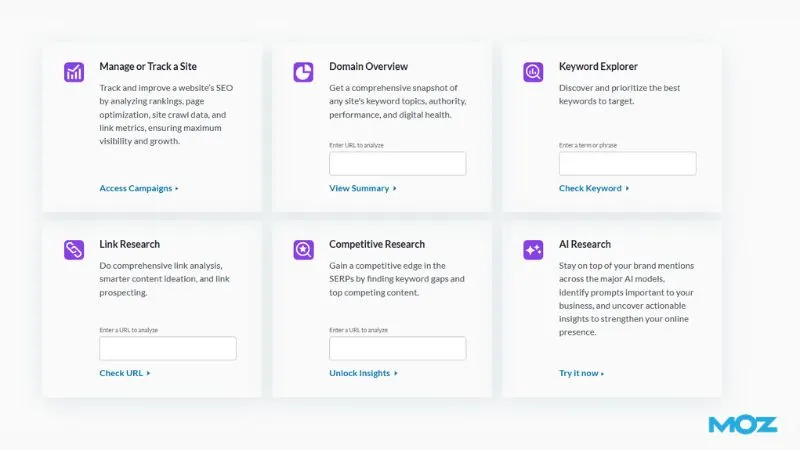
Getting Started: The Moz Pro Dashboard
When you log into Moz Pro, the first thing you see is the home dashboard. It gives you a quick snapshot of your entire SEO operation.
You get traffic metrics, crawl reports, Domain Authority scores, keyword rankings, link data, and on-page scores all in one place.
The dashboard is clean. It’s not overwhelming. But the real power sits inside each individual tool.
Moz offers a free trial to start. You get access to the full Pro toolset during the trial. That’s the best way to test every feature before you commit.
Tool 1: Moz Link Explorer (Backlink Analysis)
This is the tool Moz built its reputation on. And it still holds up.
The database behind it:
- 40.7 trillion links indexed
- 718 million root domains
- 7 trillion pages discovered
That’s one of the largest link indexes available. The original version, called Open Site Explorer, launched in 2010. Moz completely rebuilt it in 2018 as Link Explorer with faster data and better accuracy.
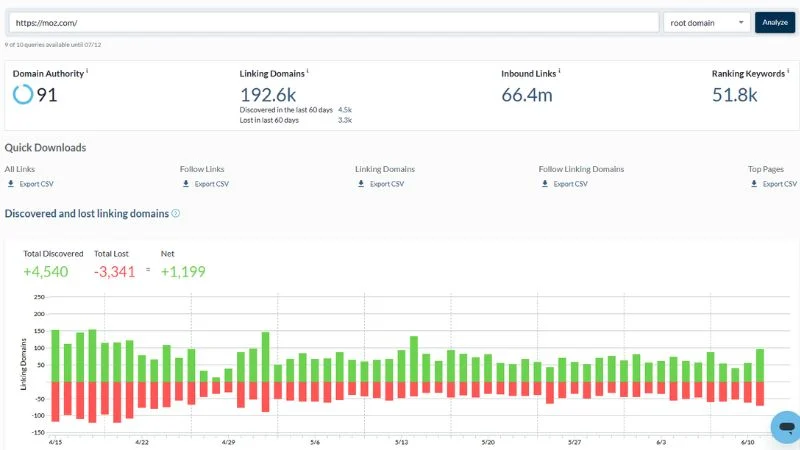
The Core Metrics You Need to Know
Domain Authority (DA): A score from 1 to 100 that predicts how likely a domain is to rank in Google. It’s not a Google metric. But it’s the most widely used third-party authority metric in the industry. SEO Director Lily Ray said it directly: “Moz is always very accurate” when comparing search volume and authority data against other tools.
Page Authority (PA): Same concept as DA, but applied to individual pages instead of whole domains.
Spam Score: Moz’s proprietary risk metric. It runs from 0% to 100%. Sites scoring above 30% carry potential risk. Anything above 60% is a serious red flag.
The 8 Tabs Inside Link Explorer
1. Overview: Your starting point. Shows DA, PA, total inbound links, linking domains, and a graph of how these metrics change over time.
2. Inbound Links: Every link pointing to your URL. Filter by follow vs. nofollow. Sort by DA. This is where you find your strongest backlinks.
3. Linking Domains: Unique websites linking to you. This matters more than raw link count. 500 links from 500 different domains beats 500 links from 5 domains every time.
4. Anchor Text: The exact words people use when they link to you. Too many exact-match anchors are a red flag for Google. A healthy profile has branded, naked URL, and topical anchors mixed together.
5. Top Pages: Which pages on your site attract the most backlinks? Use this for content gap analysis. If your competitor’s “Beginner Guide to X” has 400 linking domains, that topic clearly earns links in your space.
6. Discovered and Lost New links your site picked up. Links you’ve recently lost. Check this tab every week. A lost DA 65 link is something you want to recover fast.
7. Compare Link Profiles: Benchmark your DA, PA, and Linking Domains against up to 5 competitors at once. The comparison graphs show you exactly where you stand and how fast competitors are growing.
8. Link Intersect: This is the most powerful feature in the entire Link Explorer. It shows you sites that link to your competitors but NOT to you. These are pre-qualified outreach targets. They’re already interested in your niche. You just need to give them a reason to link to you.
Link Intersect Workflow:
- Enter your domain
- Add 3-4 competitor domains
- Sort results by DA, highest to lowest
- Export the top 50 targets
- Visit each site and identify the content that earned the competitor’s link
- Build something better
- Send a personalised pitch
Do this once a month, and you’ll always have a full outreach pipeline.
Free vs. Pro: What You Actually Get
| Feature | Free Account | Moz Pro |
|---|---|---|
| Monthly queries | 10 | Unlimited |
| Rows per query | 50 | Unlimited |
| Link Intersect | No | Yes |
| Compare Link Profiles | No | Yes (5 sites) |
| DA/PA tracking graphs | Limited | Full |
| CSV export | No | Yes |
| Link Tracking Lists | No | Yes |
| Spam Score filtering | Basic | Advanced |
The free account is enough for occasional audits. But if you’re doing serious SEO, you need Pro.
Tool 2: Keyword Explorer
Keyword Explorer is Moz’s keyword research hub. It covers two main workflows: exploring by site and exploring by keyword.
Explore by Site
Enter any domain and see every keyword it ranks for. You get:
- Ranking position
- Monthly search volume
- Keyword difficulty
- Organic CTR estimate
- Page Authority of the ranking page
This is competitor keyword intelligence. Enter your top competitor’s domain. Sort by volume. Now you can see exactly which topics are driving their organic traffic.
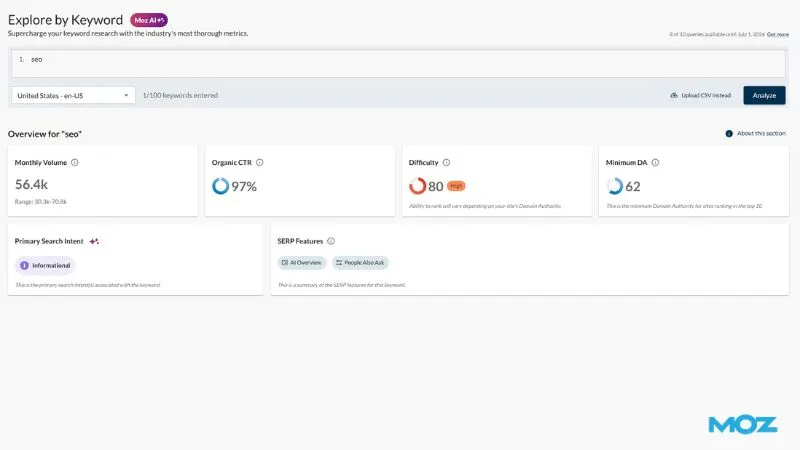
Explore by Keyword
Enter a seed keyword and get back:
- Monthly search volume range
- Keyword difficulty score (0-100)
- Organic CTR potential
- Priority score (Moz’s composite metric combining all the above)
- SERP analysis showing who currently ranks and why
- Keyword suggestions grouped by search intent
The Priority Score is underrated. Most tools just show volume and difficulty. Moz combines volume, difficulty, CTR, and your own domain’s authority into a single priority number. That tells you which keyword to go after first based on your specific site. Not just in theory.
Keyword Suggestions
This feature skips the manual grouping process. You enter a seed keyword, and Moz automatically groups related suggestions by search intent. So instead of a flat list of 500 keywords, you get organised clusters you can turn directly into content plans.
Keyword Lists
Build and save keyword lists inside the platform. Add keywords from multiple research sessions. Sort and filter by any metric. Track them over time. This is your editorial planning system inside Moz Pro.
AI Content Brief
This is a newer feature. It’s marked as “Unlock” on the free plan. Enter a target keyword, and Moz generates a content brief based on top-ranking pages. It shows you the topics to cover, the questions to answer, and the structure that’s working in the SERPs right now.
Tool 3: Domain Overview
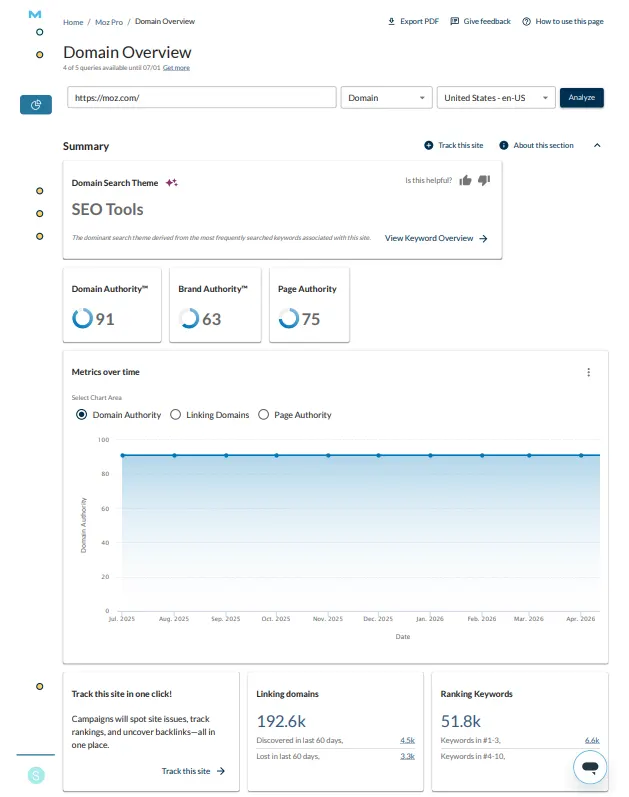
Domain Overview is your quick-intelligence tool. Enter any domain, subdomain, or exact page URL and get an instant snapshot of that site’s SEO health.
You get:
- Domain Authority score
- Top ranking keywords
- Estimated organic traffic
- Linking domain count
- Top pages by authority
- Keyword gap opportunities
The most practical use case: You’re about to pitch a guest post to a site. Before you write the email, run their domain through Domain Overview. Check their DA. Check their traffic trend. Check their top pages. If their DA is 15 and their traffic has been declining for 6 months, that link isn’t worth your time.
Domain Overview also feeds directly into Keyword Gap analysis. You can drop your domain and competitors’ domains in and immediately see which keyword opportunities you’re missing.
Tool 4: Competitive Research Suite
This is where Moz Pro gets seriously powerful. The Competitive Research section has three tools that work together.
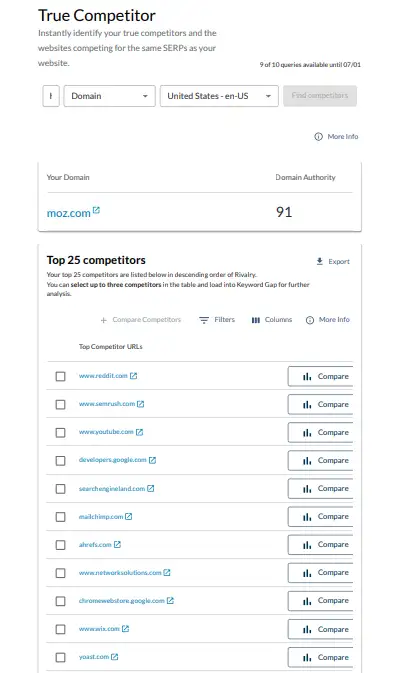
True Competitor
This tool automatically identifies which websites are actually competing with you in the SERPs. Not who you think your competitors are. Who is actually showing up for the same keywords you’re targeting?
How to use it:
- Enter your domain, subdomain, or subfolder
- Select your market (e.g., United States, en-US)
- Click “Find competitors.”
- Moz shows you your top 25 true SERP competitors
This matters because your real search competitors are often different from your business competitors. A blog in your niche might be outranking your product pages. You need to know that.
Once you identify your true competitors, you push them directly into Keyword Gap and Top Competing Content for deeper analysis.
Keyword Gap
Keyword Gap answers one question: which keywords are your competitors ranking for that you’re not?
The workflow:
- Enter your URL
- Add up to 3 competitor URLs
- Select your market
- Click “Analyze competitors.”
You get a table showing every keyword where competitors rank, but you don’t. Sort by volume. Filter by difficulty. These are your content gap opportunities.
A real use case: Say example.com ranks for 200 keywords. Competitor1.com ranks for 800 keywords in the same niche. Keyword Gap shows you the 600 keywords where they rank, and you don’t. You now have a prioritised content roadmap built directly from competitor data.
| Step | Action |
|---|---|
| 1 | Enter your URL + 3 competitor URLs |
| 2 | Run analysis |
| 3 | Filter for keywords with volume over 500 |
| 4 | Filter for difficulty under 40 |
| 5 | Export and add to your content calendar |
Top Competing Content
This tool shows you which specific pages from your competitors are earning the most traffic and ranking for the most keywords.
It’s content intelligence at the page level. You can see:
- Competitor page URL
- Number of keywords it ranks for
- Estimated traffic
- Top ranking keyword
Why this is powerful: Instead of guessing what content to create, you let your competitors’ data tell you. The pages with the most ranking keywords and the highest traffic are the topics the market cares about. Build better versions of those pages.
Tool 5: On-Page Optimization (On-Page Grader)
On-Page Grader analyses individual pages against a target keyword. It gives you a Page Optimization Score from 0 to 100.
The higher the score, the better your page is optimised for that keyword.
But the score is just the starting point. The real value is in the recommendations.
What You Get
Most Important Fixes: The issues that will have the biggest impact on your rankings if you fix them. These are flagged clearly and ranked by priority.
Content Suggestions: A list of related topics that top-ranking pages cover. These are terms and subtopics Google expects to see on a well-optimised page. Adding them can lift your rankings without building a single new link.
Solved vs. Unsolved: As you fix issues, Moz tracks your progress. You can see exactly how many factors you’ve addressed.
The Practical Workflow
- Enter your target keyword and page URL
- Review your Page Optimization Score
- Fix the “Most Important” issues first
- Add the recommended Content Suggestions to your page
- Re-run the grader to validate your improvements
This removes the guesswork from on-page SEO. You’re not optimising based on intuition. You’re following a prioritised list built from what’s actually working in the SERPs.
Tool 6: Site Crawl
Site Crawl is Moz Pro’s technical SEO auditor. It crawls your entire site and identifies issues that could be blocking search engine access, lowering your rankings, or hurting your user experience.
The crawl covers:
- Broken links (4xx errors)
- Redirect issues (chains, loops, temporary redirects)
- Missing or duplicate title tags
- Missing or duplicate meta descriptions
- Pages blocked by robots.txt or meta noindex
- Content too short or thin
- Missing H1 tags
- Slow pages
Moz Pro crawls sites at speed and keeps historical records. So you can see new issues, recurring issues, and trends over time. The dashboard uses colour-coded charts to show critical, warning, redirect, metadata, and content issues separately.
The Weekly Alert System
Moz Pro automatically crawls your site every week. If it finds new critical issues since the last crawl, it sends you an alert.
This is huge for agencies and site managers. You don’t have to remember to check. Moz Pro monitors your site and tells you when something breaks.
Jason Dodge, Founder at BlackTruck Media, said the new Site Crawl in Moz Pro Campaigns is “way faster and the issue-ignore feature is super helpful.” His agency can now handle larger site audits for bigger brands because of the speed improvement.
On-Demand Crawl
Don’t want to wait for the weekly crawl? Use On-Demand Crawl. It lets you trigger a fresh crawl any time. This is especially useful after you’ve fixed a batch of issues. You can validate the fixes immediately instead of waiting 7 days.
The Fix-and-Verify Loop
- Run Site Crawl
- Sort issues by severity (critical first)
- Fix the top issues on your site
- Trigger an On-Demand Crawl
- Confirm the issues are resolved
- Move to the next batch
This loop is how professional technical SEO gets done. Systematic, verifiable, and documented.
Tool 7: Rank Tracking (Campaigns)
Rank Tracker inside Moz Pro Campaigns monitors your keyword rankings across multiple search engines and locations. You track both your site and your competitors.
What You Can Track
- Google rankings (desktop and mobile)
- Rankings in 200+ countries
- Local rankings (city or state level)
- National vs. local breakdowns
- Competitor keyword positions
- Search Visibility Score over time
Search Visibility Score
This is Moz’s composite ranking metric. It shows you the estimated percentage of clicks you’re capturing based on your current keyword positions.
A site ranking #1 for a keyword gets more of the Search Visibility Score than one ranking #10. So this score reflects real traffic potential, not just ranking positions in a vacuum.
Track it weekly. If it’s going up, your SEO is working. If it drops, something changed, and you need to investigate.
Competitive Rank Tracking
Add up to 3 competitor domains to your campaign. Moz Pro shows you side-by-side ranking comparisons for every tracked keyword.
You can see exactly which keywords they moved up on. Which keywords did they drop? And where the gap between you is widening or closing.
Jessica Hill, SEO Manager at 99Designs, said Moz’s Keyword Ranking tool keeps her team aware of any ranking fluctuations fast. The MozBar extension adds another layer for quick competitive checks right inside search results.
Reporting
Build custom reports inside Campaigns. Choose which metrics to include. Schedule automated delivery. This is how agencies present ranking data to clients in a clean, professional format.
Brandon Doyle, CEO at Wallaroo Media, said his team builds custom reports quickly inside Moz for small, medium, and large clients. Each client gets exactly the data they need in a format they understand.
Tool 8: AI Visibility (Brand Tracking in AI Search)
This is the newest and most forward-looking part of Moz Pro. And it addresses one of the biggest questions in SEO right now.
The question: When someone asks ChatGPT, Google AI Mode, or Perplexity about your industry, does your brand show up?
Moz Pro’s AI Visibility tools help you answer that.
AI Tracking Dashboard
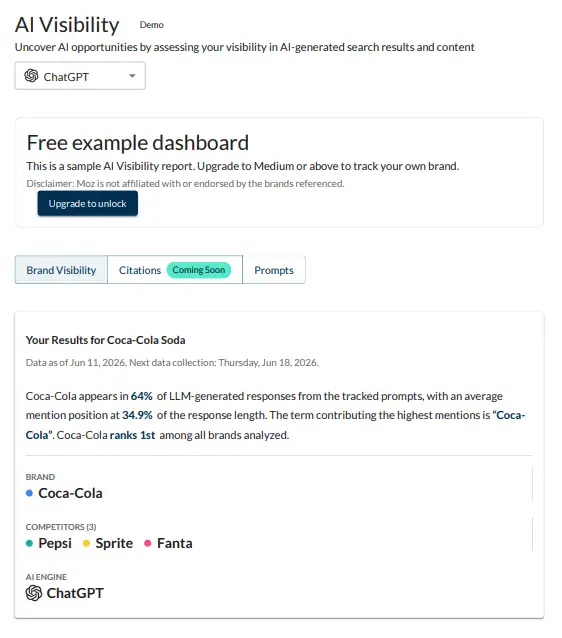
The AI Tracking Dashboard lets you monitor your brand’s presence across the major AI models. You enter your URL and up to three competitor URLs. Then you select the AI engine you want to track (GPT is one of the options shown).
The dashboard shows:
- How often your brand is mentioned across tracked prompts
- How early in the AI response does your brand appear
- How does your mention rate compare to competitors
- Trend lines over time (so you can see if your AI visibility is growing or shrinking)
This feature requires a Medium plan or above. But the free example view gives you a clear picture of what the data looks like before you upgrade.
AI Prompt Suggestions
This tool lives under AI Research inside Moz Pro. It finds the actual prompts that people are typing into AI assistants about your brand or industry.
You enter a topic relevant to your brand. Moz analyses AI search behavior and returns a list of prompts people are using.
Why this matters: AI search is not keyword-based. People ask full questions. “What’s the best email marketing tool for small businesses?” is an AI prompt, not a keyword. If you know which prompts your potential customers are typing, you can create content specifically designed to appear in those AI-generated answers.
This is the foundation of GEO, Generative Engine Optimisation. And Moz Pro is one of the first mainstream SEO tools to build a dedicated workflow around it.
Tool 9: MozBar (Browser Extension)
MozBar is Moz’s free Chrome extension. It works alongside Moz Pro, but you can download it separately.
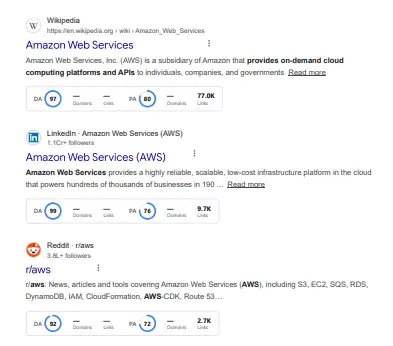
When you run a Google search, MozBar overlays DA and PA scores directly on the search results page. So you can assess the competitive strength of every ranking page without leaving Google.
It also shows you on-page elements for any website you visit. You can check:
- Page title and meta description
- H1, H2, H3 tag structure
- Link counts (follow vs. nofollow)
- Page Authority
Think of it as Moz Pro on the go. It’s like having the platform built into your browser.
Tool 10: Moz Local
Moz Local is a separate product from Moz Pro. It’s built specifically for businesses with physical locations.
It manages your presence across 90+ listing directories. That includes Google Business Profile, Yelp, Facebook, Apple Maps, and many more. One dashboard, one submission, synced across the entire network.
Moz Local Pricing
| Plan | Price (Yearly) | Best For |
|---|---|---|
| Lite | $16/month ($199/yr) | Basic listing management |
| Preferred | $24/month ($299/yr) | Reviews + social posting |
| Elite | $33/month ($399/yr) | Full social + advanced reporting |
| Enterprise | Custom | 50+ locations |
Lite gives you directory management, Local Grid map pack tracking, review monitoring, data health analytics, and Google Q&A.
Preferred (most popular) adds review responding, review sentiment analysis, social posting to Google and Facebook, content libraries, competitor analysis, and agency permissions.
Elite adds Instagram, LinkedIn, and TikTok social posting, Facebook ad boosting, social engagement responding, and a full reporting suite for leads, reviews, and social activity.
Enterprise is for brands managing 50+ locations. You get a dedicated account manager, product experts, and flexible billing.
Key Moz Local Features
Local Grid: An interactive heatmap showing exactly where you rank in local map packs across different areas of your city. You can see which zones you dominate and where competitors are beating you.
Review Management: Monitor and respond to reviews across all platforms from one dashboard. The Preferred and Elite plans include AI-powered response prompts so you can reply to reviews faster.
Listings AI: An add-on that automates presence optimisation. It actively maintains your listing accuracy and helps you appear in more local searches.
The stat Moz cites is striking: 73% of Google search results contain a local feature. If you’re a local business and you’re not managing your local presence actively, you’re invisible to most of your potential customers.
Tool 11: Moz API
The Moz API is for developers and agencies that want to integrate Moz data into their own tools, dashboards, or client reporting systems.
It starts at $20. That’s the lowest entry point in the market for access to this quality of SEO data.
What the API Includes
Keyword Metrics: Volume, difficulty, organic CTR, priority score. Build your own keyword research tool using Moz’s data.
Search Intent: Moz AI classifies every keyword as informational, navigational, commercial, or transactional. Your application can use that classification to serve users the right content type at the right stage of their journey.
Related Keywords: Pull thousands of keyword suggestions programmatically. Power your content ideation at scale.
Brand Authority: Moz’s proprietary metric measuring a brand’s overall presence and strength in search results. You can integrate this into competitive dashboards for clients.
Ranking Keywords: Discover which keywords any page ranks for in Google’s top 50 results. Get position, difficulty, and monthly volume for each.
Link Metrics: DA, PA, and Spam Score via API. This is what powers thousands of third-party SEO tools. Zillow, Trivago, Razorfish, and GroupM are among the companies using Moz data.
API Technical Specs
- JSON-RPC 2.0 architecture
- Single API token authentication (no complex OAuth setup)
- Comprehensive documentation, including quickstart guides and code examples
- 24/7 online support
- Link index: 45.5 trillion links across 1 billion domains
- Keyword data: 1.25 billion monthly keyword volumes, 800+ million keyword suggestions
- SERP data: 25 billion historical SERPs, 440 million collected monthly
Kane Jamison, Founder at Content Harmony, summed it up well. He said his team can connect to the Moz API, make a single request, and get all the link data their customers need to analyse a keyword and build better content.
Alex Drew, Co-Founder at Odys Global, said Moz’s DA is still the single most accurate measure of website authority in their marketplace of 1,000+ premium domains.
Moz Pro Plans: What Do They Cost?
Moz Pro offers tiered monthly and annual pricing. Annual billing saves you 20%.
The plans scale based on:
- Number of campaigns
- Keyword rankings tracked
- Pages crawled per week
- On-page grader reports
- API access
The free trial gives you full access to test every tool before committing. That’s the right way to evaluate it. Don’t read reviews. Use the product. See which workflows actually fit your SEO process.
What Real Users Say
John Varghese, Director of SEO at TopSpot: After switching domains, his team expected a 7-10% traffic loss. Instead, organic traffic increased by 29% within 90 days. He said it would have been much harder to navigate that domain migration without Moz Pro.
Lily Ray, SEO Director at Amsive: She recommends Moz Pro specifically for data integrity. She noted that other tools often inflate search volume. Moz, she said, is consistently accurate.
Jason Dodge, Founder at BlackTruck Media: His team relies on Moz Pro for thematic keyword research and competitive insights. He said the data gives them the confidence to create SEO and content strategies that actually work.
Moz Pro vs. Competitors: How Does It Stack Up?
| Feature | Moz Pro | Ahrefs | SEMrush |
|---|---|---|---|
| Link index size | 40.7 trillion links | 35+ trillion | 43+ trillion |
| DA/authority metric | Domain Authority | Domain Rating | Authority Score |
| Keyword research | Yes (strong) | Yes (very strong) | Yes (very strong) |
| Site audit | Yes | Yes | Yes |
| Rank tracking | Yes | Yes | Yes |
| AI visibility tracking | Yes (new) | Limited | Limited |
| Local SEO tool | Yes (Moz Local) | No | Yes (basic) |
| Free tier | Yes (10 queries/mo) | Limited | Limited |
| API access | Yes ($20 entry) | Yes (expensive) | Yes |
| Learning resources | Excellent (Moz Academy) | Good | Good |
Moz Pro is not the cheapest option. But it’s also not trying to be. It wins on data accuracy, ease of use, and the depth of its learning ecosystem. The Moz Blog, Whiteboard Friday series, and Moz Academy make it the best platform for teams that want to build real SEO expertise alongside using the tools.
Who Should Use Moz Pro?
Bloggers and content creators who want to do keyword research, track rankings, and audit backlinks without a steep learning curve.
In-house SEO teams that need a reliable, accurate platform to run campaigns, track competitors, and report to leadership.
Agencies that manage multiple client sites and need custom reporting, campaign management, and scalable workflows.
Local businesses that need to manage listings, track local rankings, and monitor reviews across multiple platforms (Moz Local specifically).
Developers and product teams that need clean API access to DA, PA, Spam Score, keyword data, and link metrics to build their own applications.
Who might look elsewhere: If you need the absolute deepest backlink index and you do nothing but link analysis all day, Ahrefs might edge Moz out on raw index size. If you need an all-in-one PPC plus SEO suite, SEMrush covers more ground. But for pure SEO depth with a clean interface and better educational support, Moz Pro holds its own.
The Moz Learning Ecosystem
This is something competitors don’t match. Moz doesn’t just give you a tool. It gives you the knowledge to use it properly.
Inside Moz Pro, you get access to:
- Moz Academy: On-demand courses and certifications from beginner to expert
- Whiteboard Friday: Weekly SEO video series by industry experts
- Moz Blog: One of the most trusted SEO content sources online
- SEO Learning Center: Deep guides on every major SEO topic
- Help Hub: Step-by-step guides for every tool in the platform
- Beginner’s Guide to SEO: The most widely read SEO guide on the internet
The Moz Academy lets you build real, verifiable SEO skills. Not just tool knowledge. Strategic SEO thinking.
This matters more than people realise. A tool is only as good as the strategy behind it. Moz Pro gives you both.
5 Mistakes to Avoid When Using Moz Pro
#1: Only tracking your own site: Moz Pro is most powerful when you use it to spy on competitors. Set up campaigns for your top 3 competitors, not just your own domain.
#2: Ignoring Site Crawl alerts: The weekly crawl alert is automated. But many people ignore the emails. A broken redirect or missing title tag can quietly cost you rankings for weeks.
#3: Using DA as an absolute ranking predictor: DA is a comparative metric. A DA 45 site can outrank a DA 70 site for low-competition keywords. Use it for comparison, not as a fixed rule.
#4: Skipping the AI Visibility tools: Most SEOs are still ignoring AI search. That’s a short-term mistake. Start tracking your brand’s presence in AI responses now. The brands doing this today will have a head start when AI search overtakes traditional search behavior.
#5: Not using Keyword Gap regularly: Keyword Gap is not a one-time audit. Run it quarterly. Your competitors are publishing new content constantly. New gap opportunities appear every few months.
A Full Week of Moz Pro Workflows
Here’s how a serious SEO practitioner uses Moz Pro across a full week:
| Day | Task | Tool Used |
|---|---|---|
| Monday | Check ranking changes from last week | Rank Tracker (Campaigns) |
| Monday | Review discovered and lost backlinks | Link Explorer |
| Tuesday | Identify new keyword opportunities | Keyword Explorer, Keyword Gap |
| Wednesday | Audit top content pages for optimisation | On-Page Grader |
| Wednesday | Review content suggestions for priority pages | On-Page Grader |
| Thursday | Check Site Crawl for new technical issues | Site Crawl |
| Thursday | Run On-Demand Crawl after fixing issues | On-Demand Crawl |
| Friday | Research competitor backlinks for outreach | Link Explorer, Link Intersect |
| Friday | Check AI visibility mentions | AI Tracking Dashboard |
Follow this pattern for 90 days. You’ll see measurable ranking improvements across almost every site.
FAQs: Moz Pro Review 2026
Is Moz Pro free to use?
Moz Pro is not free, but it offers a free trial with full access to all tools. You also get a free Moz Community account with 10 backlink queries per month, access to Domain Authority, Page Authority, Spam Score, and basic link data, with no credit card required.
What is Domain Authority in Moz Pro?
Domain Authority (DA) is Moz’s proprietary score from 1 to 100. It predicts how likely a website is to rank in Google search results. A higher DA means stronger ranking potential. It’s not a Google metric, but it’s the most widely used third-party authority score in the SEO industry.
How accurate is Moz Pro data?
Moz Pro is known for data accuracy. Lily Ray, SEO Director at Amsive, said that while other tools often inflate search volume, Moz is consistently accurate. The link index covers 40.7 trillion links across 718 million root domains, making it one of the largest and most reliable datasets available.
What is the difference between Moz Pro and Moz Local?
Moz Pro is for SEO professionals managing organic search strategy, backlinks, keyword rankings, and site audits. Moz Local is for businesses with physical locations. It manages listings across 90+ directories like Google Business Profile, Yelp, and Apple Maps, and handles review monitoring and social posting.
What is Spam Score in Moz?
Spam Score is Moz’s risk metric for backlinks. It runs from 0% to 100%. Sites scoring between 0-10% are low risk and safe to target. Sites scoring above 30% need manual review. Anything above 60% is a serious red flag and should be disavowed from your backlink profile using Google Search Console.
Can Moz Pro track AI search visibility?
Yes. Moz Pro now includes an AI Visibility Tracking Dashboard. It monitors how often your brand appears in responses from AI engines like ChatGPT and Google AI Mode. You can compare your brand’s AI mention rate against up to three competitors and track trends over time. This feature is available on Medium plans and above.
How is Moz Pro different from Ahrefs and SEMrush?
All three are strong SEO platforms. Moz Pro wins on data accuracy, ease of use, and learning resources. Ahrefs has a slightly larger raw backlink index. SEMrush covers more ground, including PPC data. But Moz Pro is the only one with a dedicated AI visibility tracking dashboard and the most comprehensive free learning ecosystem via Moz Academy and Whiteboard Friday.
What is the Link Intersect tool in Moz Pro?
Link Intersect shows you websites that link to your competitors but not to your site. You enter your domain and up to four competitor domains. Moz returns a list of sites already linking in your niche. These are pre-qualified outreach targets. Sort by Domain Authority and start your outreach from the top.
How much does Moz Pro cost?
Moz Pro offers tiered plans with monthly and annual billing. Annual billing saves you 20%. Plans scale based on the number of campaigns, keywords tracked, pages crawled per week, and on-page grader reports. A free trial gives you full access before you commit to any plan.
Is Moz Pro good for beginners?
Yes. Moz Pro is one of the most beginner-friendly SEO platforms available. It includes Moz Academy with on-demand courses and certifications, the Beginner’s Guide to SEO, Whiteboard Friday video series, and a Help Hub with step-by-step guides for every tool. You get the platform and the education to use it properly.
Conclusion
Moz Pro is not for people who want a simple rank checker. It’s for SEOs who want a serious, data-driven platform to build and scale an organic search strategy.
It covers every part of the SEO process. Link research. Keyword research. Competitive intelligence. Technical audits. Rank tracking. On-page optimisation. And now, AI visibility tracking.
The free trial gives you full access. The Moz Link Explorer free tier gives you 10 queries per month with no credit card required. And the Moz Local plans start at just $16 per month for local businesses that need to manage their presence across 90+ directories.
The data is accurate. The interface is clean. The learning resources are the best in the industry. And the new AI visibility tools put Moz ahead of most competitors in preparing marketers for the next era of search.
Your action step today: Go to moz.com and start a free trial. Run Domain Overview on your top competitor. Then run Keyword Gap between your domain and theirs. In 15 minutes, you’ll have a content roadmap you can start executing this week.
Here’s my question for you: which part of your SEO strategy feels most stuck right now, and which Moz Pro tool do you think would move the needle fastest for your specific situation?